
In 2026, choosing one of the best AI website builders no longer requires starting from a blank template, learning to code, or designing every section manually.
With an AI website builder, you can describe the website you want in natural language and ask artificial intelligence to create:
- The page structure,
- Headings,
- Descriptions,
- Color system,
- Visual layout,
- Mobile design,
- Contact sections.
However, not every tool on the market is built for the same purpose.
Some platforms focus on helping small businesses get online within minutes. Some give designers detailed visual control. Others create WordPress websites, e-commerce stores, or web applications with memberships and databases.
For that reason, the right question is not simply:
Which AI website builder is the best?
A better question is:
Which AI website builder is the best fit for the website I want to create?
In this guide, we compare the leading AI website creation tools of 2026 according to the criteria below. You can also read What Is an AI Website Builder? for the fundamentals and Website Development Costs in 2026 for pricing:
- Ease of use
- AI generation quality
- Turkish prompt support
- Design control
- Mobile responsiveness
- Ease of content editing
- SEO features
- Domain and hosting
- E-commerce
- Blog and CMS
- Payments and bookings
- Custom web application development
- Free usage options
- Long-term scalability
In brief: Atalay AI stands out for Turkish-speaking small businesses, Wix for general use and broad business tools, Framer for design-focused websites, Webflow for professional marketing teams, Hostinger for affordable hosting bundles, 10Web for WordPress, and Shopify for e-commerce. The right choice depends on the type of website you want to build.
Which Is the Best AI Website Builder?
There is no single best tool for every user.
The recommendations below are based on different use cases:
| Use case | Recommended tool |
|---|---|
| Turkish small-business website | Atalay AI |
| General use | Wix |
| Visual design and landing pages | Framer |
| Professional marketing website and CMS | Webflow |
| Affordable package with hosting | Hostinger |
| Premium portfolio and creative brand | Squarespace |
| Local service business | Durable |
| WordPress website | 10Web |
| E-commerce store | Shopify |
| Simple one-page website | Canva |
| Custom web application or MVP | Lovable |
| Website, domain, and payments through chat | Promake |
Treating all of these tools as though they belong to exactly the same category can be misleading.
Shopify, for example, is primarily an e-commerce platform. Framer is strong for design and marketing websites. Lovable is used more for custom web applications and digital products than for conventional business websites.
Best AI Website Builder Comparison
| Tool | Best for | Free option | Design control | E-commerce | Turkish focus |
|---|---|---|---|---|---|
| Atalay AI | Turkish business websites | 30-day free trial | Medium | Separate product (Shop) | Very strong |
| Wix | General business use | Permanent free plan | High | Strong | Medium |
| Framer | Landing pages and portfolios | Permanent free plan | Very high | Limited | Medium |
| Webflow | Professional brands and CMS | Free starter option | Very high | Via integrations | Medium |
| Hostinger | Affordable business websites | Trial/plan dependent | Medium | Available | Medium |
| Squarespace | Creative and premium websites | 14-day trial | High | Available | Medium |
| Durable | Service businesses | Free site generation | Medium | Limited | Limited |
| 10Web | WordPress | Free site generation | High | WooCommerce | Medium |
| Shopify | E-commerce | Free trial | Medium | Very strong | Medium |
| Canva | One-page websites | Permanent free option | High | Limited | Good |
| Lovable | Web applications and MVPs | Free usage tier | Code-based | Extendable | Good |
| Promake | Chat-based business websites | Free credits | Chat-based | Available | Good |
Note: Free plans, credit allowances, and prices can change over time. Check each platform's current pricing page before making a decision.
How We Evaluated AI Website Builders

This comparison does not consider only the first design generated by each tool.
The true value of an AI website builder becomes clearer after the initial draft has been created.
Our evaluation criteria are listed below.
1. Prompt Understanding Quality
Can the tool correctly understand the business type, target audience, services, and conversion goal?
The following two requests should not be handled in the same way:
Create a website for a dental clinic that serves children.
Create a website for a law firm that serves international companies.
The first website should feel warmer and more family-friendly, while the second should look corporate and trustworthy.
2. Usability of the Generated Website
Is the first result merely an attractive screenshot, or is it a real website that can be edited and published?
3. Editing Individual Content Elements
Can headings, descriptions, buttons, images, and links be edited separately?
Users should not have to regenerate an entire section just to change a small piece of text.
4. Mobile Responsiveness
Does the website work properly on phones, tablets, and desktop screens?
Google recommends responsive web design because it is one of the easiest mobile configurations to implement and maintain.
5. SEO Control
Can users edit the following fields?
- Page title
- Meta description
- URL
- Image alt text
- Canonical URL
- Robots settings
- Sitemap
- Redirects
- Structured data
6. Ease of Publishing
Can the domain, SSL, hosting, and publishing process be managed from the same platform?
7. Business Features
Does the platform provide features such as:
- Forms
- Maps
- Appointments
- Reservations
- Blog
- Analytics
- Payments
- E-commerce
8. Long-Term Flexibility
Can you add new pages, languages, products, content, and integrations as the business grows?
Detailed Review of the 12 Best AI Website Builders
1. Atalay AI — Best for Turkish Small-Business Websites
Best suited for:
- Small businesses in Türkiye
- Restaurants
- Beauty salons
- Consultants
- Local tradespeople
- Freelancers
- Entrepreneurs who want a Turkish website
- Users without technical knowledge
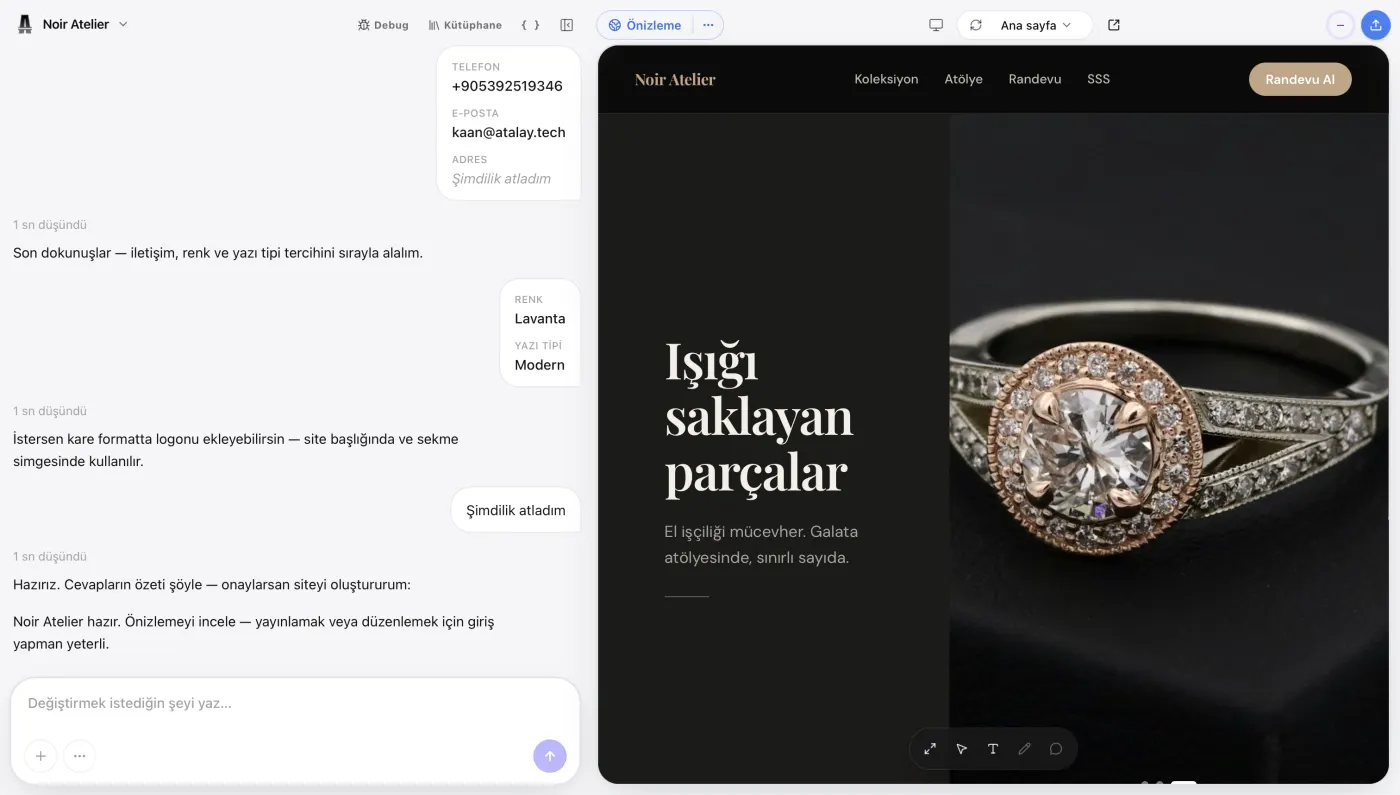
Atalay AI is the AI for Turkish-speaking businesses; its website product is Atalay Website (atalay.website). The user describes their business in Turkish to Emre, an AI employee, in the atalay.ai chat, and a mobile-friendly site is ready within minutes.
Setup is free and the site can be tried free for 30 days. Atalay Website focuses on presentation websites for businesses such as cafes, restaurants, hair and beauty salons, clinics, tradespeople, workshops, and shops; e-commerce is a separate product, Atalay Mağaza (atalay.shop).
Example prompt:
Create a website for a premium beauty salon in Ataşehir, Istanbul. Include our skincare, laser hair removal, and permanent makeup services. Customers should be able to request a free consultation through WhatsApp.
Build a site with this prompt
Based on this description, Atalay AI can generate:
- A home page,
- Service sections,
- Headings and copy,
- Mobile design,
- Contact sections,
- Suitable CTA buttons.
Atalay AI's Strengths
- Focus on Turkish and local-business scenarios
- 30-day free trial and free setup
- Building the site by chat and editing it from your phone
- Hosting and SSL included in the platform
- WhatsApp, call, and directions buttons
- Custom domain connection (from the Professional package)
- Contact and appointment request form, SEO settings, and Google Maps business information (Professional)
- Business email and priority support (Business)
- Custom software options through Atalay Tech
Atalay Website packages are monthly and exclude VAT: Starter ₺490/month (yourname.atalay.website address), Professional ₺990/month (your own domain), Business ₺1.990/month. Hosting and SSL are included in every package.
Atalay AI's Limitations
- Its third-party app ecosystem may not yet be as broad as Wix or WordPress.
- Highly specialized membership and operational systems may exceed the scope of a standard website builder.
- The number of global templates and integrations may be lower than larger competitors.
- Because it is a new product, its features may change quickly.
Who Should Choose Atalay AI?
It is a strong choice for users who want to:
- Build a website with a Turkish prompt
- Build a site by chat, without dealing with technical details
- Publish a business website quickly
- Collect leads through WhatsApp or forms
- Manage the domain, SSL, and hosting in one place
- Move to custom software or a mobile application later
Verdict: One of the most practical options for businesses operating in Türkiye that want a website quickly without dealing with technical details.
To try Atalay AI in practice, read How to Build a Website with Atalay AI. For a deeper comparison of Atalay AI, Wix, Framer, and Lovable, see the comparison article.
2. Wix — Most Comprehensive Option for General Use
Best suited for:
- Small and medium-sized businesses
- Service providers
- E-commerce businesses
- Event organizers
- Appointment-based businesses
- Users who need many ready-made features
Wix is a comprehensive website builder that combines AI generation with visual editing and can create a website tailored to a business from a user's description.
Wix's AI website builder can generate a page structure, industry-specific content, and business tools based on the company's goals and design preferences. Users can then change the details with a drag-and-drop editor.
Wix states that Wix Harmony, announced in 2026, combines AI generation, visual editing, and production-ready business infrastructure.
Wix's Strengths
- Extensive built-in features
- Advanced drag-and-drop editor
- Booking and event tools
- E-commerce
- Blogging
- Forms
- Marketing features
- Large template library
- Free starting option
- App ecosystem
- Business management tools
Wix's Free Plan
Creating a website with Wix is free.
However, connecting a custom domain and removing Wix branding require a Premium plan. Wix offers a 14-day money-back period on the first Premium upgrade and a free first-year domain voucher with some annual plans.
Wix's Limitations
- The large number of features may feel complicated to new users.
- Plan and app costs can grow over time.
- Migrating away from the platform may not be easy.
- It remains limited for projects that require fully custom software.
- Initial Turkish content may need manual editing.
Who Should Choose Wix?
- Users who want many business features in one platform
- Businesses that need e-commerce, bookings, or event management
- Users who want detailed visual editing control
- Businesses targeting an international market
Verdict: One of the most feature-rich general-purpose AI website builders available.
3. Framer — Best for Design and Landing Pages
Best suited for:
- Designers
- SaaS startups
- Agencies
- Startups
- Portfolio owners
- Teams building conversion-focused landing pages
- Brands that want powerful animations
Framer focuses on allowing AI-generated pages to be fully edited on a visual canvas.
Users describe the website, page, or section they want. Framer's AI agent generates editable pages, sections, text, and images. Users can continue refining the site through chat or move directly to the visual canvas.
Framer also provides CMS, SEO settings, hosting, analytics, and publishing in the same system.
Framer's Strengths
- Powerful visual design control
- Modern, premium-looking output
- Animations and interactions
- Editable AI-generated pages
- CMS
- SEO settings
- Responsive design
- Hosting
- Team collaboration
- Fast landing-page creation
Framer's Free Plan
Framer's free plan includes:
- 500 trial credits,
- A free Framer domain,
- 1 GB of bandwidth,
- Design pages.
Framer's Limitations
- It may not be as simple for beginners as Wix or Atalay AI.
- Design knowledge is helpful for advanced editing.
- It is not the first choice for complex e-commerce and business operations.
- Membership and database workflows may require external systems.
- Plan selection becomes important for large, content-heavy websites.
Who Should Choose Framer?
- Users who prioritize design quality
- SaaS and technology companies creating landing pages
- Designers building portfolio websites
- Brands that want animated marketing websites
- Teams that need detailed visual control
Verdict: One of the strongest AI website builders of 2026 for design quality and visual control.
4. Webflow — Best for Professional Teams and CMS
Best suited for:
- Professional design teams
- Marketing teams
- Corporate brands
- Agencies
- Content-heavy websites
- Companies using an advanced CMS
- Teams building design systems
Webflow has evolved beyond a traditional no-code website builder into a professional web experience and marketing platform.
Webflow's AI site builder creates not only a page layout from a prompt, but also a functional starter website and an editable design system. Colors, buttons, images, and animation settings can then be customized.
Webflow AI also supports changing page designs, generating text and code, conversion optimization, and content management.
Webflow's Strengths
- Professional design control
- Advanced responsive system
- Powerful CMS
- Enterprise scale
- SEO and AEO features
- Analytics
- Design systems
- Team collaboration
- Enterprise security options
- React components and custom development capabilities
Webflow's Free Plan
Webflow allows users to start building a website for free. A paid Site plan is required for custom domains, advanced content, and professional publishing features.
Webflow's Limitations
- Its learning curve is steeper than most alternatives.
- Understanding technical design concepts is helpful.
- It can be unnecessarily complex for a simple local-business website.
- Plan and user costs can grow.
- Its e-commerce capabilities are not as comprehensive as Shopify's.
Who Should Choose Webflow?
- Teams building corporate marketing websites
- Businesses that need advanced CMS and dynamic content
- Agencies that want detailed design control
- Marketing teams that will continuously optimize the website
- Brands managing many content and campaign pages
Verdict: One of the strongest choices for professional teams and large brand websites, although it is not the easiest tool for beginners.
5. Hostinger — Best Affordable Package with Hosting Included
Best suited for:
- Budget-conscious small businesses
- Users who want a domain and hosting together
- Businesses creating a simple website
- Portfolio owners
- Small e-commerce businesses
- Users who do not want to manage technical setup
Hostinger Website Builder can create an AI-powered website from a user's description of their business.
Generated websites are responsive by default, and users can separately adjust the mobile view through the drag-and-drop editor. Content, design, pages, and layouts can also be changed after the website is published.
Hostinger combines AI content and image generation, logo tools, SEO features, and business tools with its hosting infrastructure.
Hostinger's Strengths
- Hosting included
- Ease of use
- AI website generation
- Responsive design
- AI content and image tools
- E-commerce options
- Domain offers
- Drag-and-drop editor
- Minimal technical setup
Hostinger's Limitations
- Long-term publishing usually requires a paid hosting package rather than a permanent free plan.
- Design control is less detailed than Framer or Webflow.
- Its app and integration ecosystem may be more limited than Wix's.
- It is not suitable for highly complex web applications.
How Hostinger Horizons Is Different
Hostinger Horizons differs from the standard website builder by focusing on prompt-based website and web application development. It may therefore be worth considering for projects that include user accounts, data, or more specialized functionality.
Who Should Choose Hostinger?
- Users who want an affordable business website
- Businesses looking for hosting, SSL, and a website builder in one package
- Users without technical knowledge
- Businesses creating a simple store or portfolio
Verdict: A balanced choice for users who want to build a website with an affordable hosting package.
6. Squarespace — Best for Creatives and Premium Brands
Best suited for:
- Photographers
- Artists
- Designers
- Architects
- Premium service brands
- Portfolio owners
- Businesses that prioritize visual aesthetics
Squarespace Blueprint AI creates a personalized website based on the user's business type, goals, and brand preferences.
The system recommends a site structure, content, color palette, fonts, and visual direction. The generated website can then be changed through Squarespace's visual editor.
Squarespace's Strengths
- High design quality
- Consistent, premium templates
- Blueprint AI
- Strong portfolio structures
- Blogging
- E-commerce
- Appointments and service sales
- Managed hosting
- Design system that maintains brand consistency
Squarespace's Free Plan
Instead of a permanent free plan, Squarespace offers a 14-day free trial for each new website.
Annual plans may include a free custom domain for the first year, and hosting is included with all website plans.
Squarespace's Limitations
- There is no permanent free publishing option.
- Visual editing is less flexible than Framer.
- It may be limited for highly specialized workflows.
- Some integrations and selling features require higher-tier plans.
- Initial Turkish content may need editing.
Who Should Choose Squarespace?
- Creative professionals who need a portfolio website
- Brands that value visual quality more than technical flexibility
- Users creating premium service or personal-brand websites
- Anyone who wants an easy-to-manage, aesthetically polished website
Verdict: A strong choice for users who want a premium-looking website without making every design decision themselves.
7. Durable — Fastest Option for Service Businesses
Best suited for:
- Consultants
- Cleaning companies
- Repair businesses
- Coaches
- Construction and maintenance companies
- Local service businesses
- Users who want to publish very quickly
Durable focuses on creating websites for small service businesses from a short description.
The platform states that it can generate a business website with page structure, images, and marketing copy from a user's request, with the first version ready in approximately 30 seconds.
Durable is positioned not only as a website builder, but as a business platform that includes CRM, SEO/GEO, and marketing tools.
Durable's Strengths
- Very fast initial generation
- Structure suited to local service businesses
- Ready-made business copy
- CRM tools
- Marketing tools
- Blog generation
- SEO features
- Low technical knowledge requirement
Durable's Limitations
- Designs may look similar to one another.
- Visual control is not as powerful as Framer or Webflow.
- It is not suitable for complex CMS or e-commerce requirements.
- Turkish-language usage and local integrations may be limited.
- Its SEO and ranking claims should not be treated as guarantees.
No website builder or SEO tool can guarantee a specific Google ranking.
Who Should Choose Durable?
- Users who want a simple service-business website
- Users who do not want to spend much time on design
- Businesses that want CRM and website tools together
- Companies that need to establish an online presence very quickly
Verdict: Strong on speed, but it may not be enough for users who want detailed brand design and extensive customization.
8. 10Web — Best AI Website Builder for WordPress
Best suited for:
- Users who want WordPress
- Businesses rebuilding an existing WordPress website
- Agencies
- Blogs and content websites
- WooCommerce businesses
- Users who prefer an open-source ecosystem
10Web combines WordPress infrastructure with AI-powered generation and hosting tools.
Users can describe their website to create an initial draft. They can then request changes through AI Co-Pilot or use the drag-and-drop editor to modify pages, sections, colors, and layouts.
10Web supports different WordPress projects, including business, service, portfolio, community, and education websites.
10Web's Strengths
- WordPress infrastructure
- AI generation from scratch
- Ability to recreate an existing website
- AI Co-Pilot
- Drag-and-drop editing
- WooCommerce support
- Hosting
- Agency and multi-site management
- WordPress plugin ecosystem
10Web's Limitations
- It does not eliminate WordPress maintenance completely.
- Plugin compatibility and security still need to be monitored.
- It may feel more complicated to beginners than conventional AI website builders.
- Publishing a free generated website professionally may require a paid plan.
- Its Elementor-based structure may require performance optimization.
Who Should Choose 10Web?
- Users who want control within WordPress
- Businesses that want to retain the WordPress ecosystem
- Agencies managing multiple client websites
- Businesses creating WooCommerce stores
- Users who want the flexibility to move the site to another WordPress environment
Verdict: One of the strongest options for combining AI convenience with WordPress flexibility.
9. Shopify — Best AI Site Builder for E-Commerce
Best suited for:
- Businesses selling products online
- Direct-to-consumer brands
- Stores with many products
- International e-commerce
- Businesses that need inventory and order management
- Brands combining physical and online sales
Shopify focuses on e-commerce operations rather than traditional corporate websites.
Shopify AI Store Builder can generate a designed, sales-ready store starter from the user's description. The platform also provides product, payment, checkout, and store-management infrastructure in the same system.
Shopify Magic offers AI features integrated into store creation, marketing, customer support, and back-office operations.
Shopify's Strengths
- Powerful e-commerce infrastructure
- Product management
- Inventory
- Orders
- Payments
- Checkout
- Shipping integrations
- App marketplace
- International selling
- AI product and content tools
- Scalability
Shopify's Limitations
- It can be excessive for a simple corporate information website.
- Monthly plans and app costs can grow.
- Full design control may require theme-development knowledge.
- Payment, invoicing, and shipping systems in Türkiye should be evaluated separately.
- Custom applications may require a developer.
Who Should Choose Shopify?
- Businesses whose primary goal is selling products online
- Companies that need professional order and inventory management
- Brands planning to sell internationally
- Businesses that will benefit from an extensive e-commerce app ecosystem
Verdict: The strongest choice for users who want to build a real e-commerce operation rather than a simple website.
10. Canva — Best for Simple, Visual One-Page Websites
Best suited for:
- Event organizers
- Students
- Portfolio creators
- Social media users
- Users who need a simple landing page
- Teams with visual design experience
Canva Websites allows users to create and publish responsive web pages without coding inside Canva's design editor.
Canva integrates AI-powered image, text, and interactive-component generation into its website builder.
With Canva Code 2.0, users can create code-based components for websites, applications, and interactive experiences, then edit them like regular Canva designs.
Canva's Strengths
- Very easy visual design
- Free usage
- Large template library
- Brand kit
- Integration with social media designs
- Landing pages
- Event pages
- Portfolios
- Mobile-responsive publishing
- AI image and text tools
Canva's Limitations
- It may be limited for comprehensive multi-page corporate websites.
- Its CMS and blog capabilities are not as strong as professional platforms.
- It may not provide advanced SEO control.
- E-commerce and business operations are limited.
- It is not designed for large, dynamic websites.
Who Should Choose Canva?
- Users creating a quick campaign page
- Users who want a web page that feels like a visual presentation
- People creating an event page or personal portfolio
- Teams already working within the Canva ecosystem
Verdict: Successful for visually appealing, simple, and fast one-page projects, but not suitable as a long-term corporate website platform for every business.
11. Lovable — Best for Custom Web Applications and MVPs
Best suited for:
- Entrepreneurs
- Startup founders
- Product teams
- Teams creating SaaS MVPs
- Developers building membership-based applications
- Users who need databases and custom functionality
- Teams seeking more control over code
Lovable is closer to an AI-powered application development platform than a conventional website builder.
Users can create websites, applications, and digital products through natural language. The platform focuses not only on promotional pages but also on projects with custom functionality.
In Lovable's small-business workflow, users describe their business goals, the platform generates a design, and users customize the brand, services, and CTA sections before publishing the project.
Lovable's Strengths
- Custom web application development
- Prompt-based generation
- Frontend and backend scenarios
- Memberships
- Database connections
- Payment integrations
- SaaS and MVP development
- Code-level flexibility
- Structure that developers can continue building on
Lovable's Limitations
- It may be unnecessarily complex for someone who only needs a simple business website.
- Generated applications must be thoroughly tested.
- Security, authorization, and data structures should be reviewed.
- Coding knowledge becomes increasingly valuable as the project grows.
- Traditional CMS and content management may not be as simple as in website-builder platforms.
Who Should Choose Lovable?
- Users building a digital product rather than a simple website
- Projects that need membership, databases, or custom screens
- Startups testing an MVP quickly
- Teams that want developers to continue working on the generated project later
Verdict: Suitable for creating custom web applications and SaaS MVPs rather than conventional corporate information websites.
12. Promake — Best for Building a Website, Domain, and Payments Through Chat
Best suited for:
- Users who want a chat-based experience
- Businesses creating a company website
- Users who want to manage the domain and payments in the same workflow
- Users who do not want to deal with technical dashboards
- Businesses that want to publish quickly
Promake is an AI-first platform designed to create professional websites from messages provided through a chat interface.
Its official description states that websites and web applications can be generated from prompts and managed together with domain and payment features.
Promake states that it provides new users with free starting credits.
Promake's Strengths
- Chat-based generation
- Website and web-application approach
- Domain workflow
- Online payments
- Free starting credits
- Focus on reducing the need for technical dashboards
- Fast online launch for businesses
Promake's Limitations
- Generation may take longer than some traditional website tools.
- The ease of making small text and component edits should be tested.
- Total costs after free credits are used should be evaluated.
- As a newer platform, its integration and template ecosystem may be more limited than larger competitors.
- The technical quality of generated infrastructure should be reviewed for complex projects.
Who Should Choose Promake?
- Users who want to create an entire website through conversation
- Businesses that want to manage the domain and payments in one workflow
- Users who prefer describing their needs instead of choosing a template
- Users who want to test an AI-first website creation experience
Verdict: A noteworthy option that combines chat-based website creation with business tools.
Best AI Website Builder by Use Case

For a Turkish Business Website: Atalay AI
Atalay AI stands out for building the site by Turkish chat, local-business use cases, a 30-day free trial, and integrated domain, SSL, and hosting.
For the Most Comprehensive General Use: Wix
Wix combines website creation, e-commerce, bookings, events, and marketing tools in one platform.
For the Best Design: Framer
Framer provides strong visual control for landing pages, SaaS websites, and portfolio projects.
For a Professional CMS: Webflow
Webflow provides detailed design and CMS capabilities for corporate brands, content teams, and marketing teams.
For the Most Affordable Hosting Package: Hostinger
Hostinger is suitable for users who want to handle the website builder, hosting, and domain through an affordable package.
For a Premium Portfolio: Squarespace
Squarespace is strong for creative professionals and visually refined brand websites.
For the Fastest Service-Business Website: Durable
Durable is suitable for users who want to build a simple service-business website quickly.
For WordPress: 10Web
10Web stands out for users who want AI generation without giving up the WordPress ecosystem.
For E-Commerce: Shopify
Shopify is the most comprehensive option for stores with product, payment, inventory, and order operations.
For a Simple One-Page Website: Canva
Canva is fast for event, campaign, portfolio, and simple landing-page projects.
For Web Applications: Lovable
Lovable is more suitable for MVPs with memberships, databases, and custom functionality.
Which Is the Best Free AI Website Builder?

The meaning of free usage differs from one platform to another.
Some tools:
- Let you create a website for free,
- But require payment to publish it.
Others:
- Publish on a free subdomain,
- But display platform branding.
Some platforms:
- Provide a limited number of AI credits,
- Then direct users to a paid plan when the credits are exhausted.
Leading Tools with Permanent Free Plans
Atalay AI
There is no permanent free package. Atalay Website can be tried free for 30 days and setup is free; the site opens at yourname.atalay.website. Hosting and SSL are included.
Wix
Users can create a website for free and publish it on a Wix subdomain. A paid plan is required for a custom domain and removal of Wix branding.
Framer
Framer provides a free Framer domain, limited bandwidth, and AI credits.
Webflow
The free starter plan allows users to create and publish a website on a Webflow subdomain. Professional features require a paid plan.
Canva
Simple, responsive web pages can be created and published for free.
Tools That Offer a Free Trial
- Squarespace: 14-day trial
- Shopify: free trial
- Hostinger: depends on the campaign or trial model
- 10Web: free generation or trial
- Durable: free start/site generation
- Promake: free AI credits
Best Free Choice by Need
| Need | Recommendation |
|---|---|
| Turkish business website | Atalay AI |
| Comprehensive general website | Wix |
| Design and portfolio | Framer |
| Learning professional web design | Webflow |
| Visual one-page website | Canva |
| Testing a web application | Lovable |
What Should You Consider When Choosing an AI Website Builder?
1. Define the Type of Website You Want to Build
Start by classifying your needs:
- Corporate website
- Small-business website
- Portfolio
- Landing page
- Blog
- E-commerce
- Booking website
- Membership application
- SaaS
- Marketplace
Choosing Shopify for a conventional corporate website, Canva alone for a serious e-commerce operation, or a traditional website builder for a complex SaaS product may not be appropriate.
2. Test It with a Turkish Prompt
Enter the following prompt into the tool:
Create a website for a premium women's hair salon in Kadıköy, Istanbul. We offer haircuts, balayage, coloring, and keratin treatments. Customers should be able to book an appointment through WhatsApp.
Build a site with this prompt
Check the following:
- Does the Turkish sound natural?
- Has the business been understood correctly?
- Are the services accurate?
- Is the design appropriate for the industry?
- Is the CTA correct?
- Are Turkish characters displayed properly?
3. Test Small Edits
The first design may look good, but what really matters is how easily you can:
- Change the heading
- Change button text
- Replace an image
- Add a new service
- Move a section
- Change the phone number
- Fix the mobile view
4. Check the Mobile View
Open the website on a real phone.
Check whether:
- The menu works
- Headings overflow
- Buttons are usable
- Forms can be completed
- Images display correctly
- Horizontal scrolling appears
- The page loads quickly
5. Review the SEO Fields
At a minimum, the platform should provide:
- Title
- Meta description
- URL
- Alt text
- Sitemap
- Canonical URL
- Robots settings
- Redirects
6. Confirm Domain Ownership
The domain should be registered in the business's own name and account.
You should be able to point the domain to another system if you change platforms.
7. Calculate the Total Cost
Do not consider only the introductory price.
Review costs for:
- Monthly plan
- Domain
- Business email
- E-commerce
- Payment commission
- AI credits
- Additional users
- Multiple languages
- Applications
- Form limits
- Traffic and storage
8. Research Data Portability
When you change platforms:
- Can you export the content?
- Can you transfer the domain?
- Can you download blog posts?
- Can you export products?
- Can you access the source code?
These questions determine the level of long-term platform dependency.
Is an AI Website Builder Suitable for SEO?
Yes. An SEO-friendly website can be built with an AI website builder that provides a technically sound structure.
However, building a website with AI does not guarantee rankings automatically.
Google states that it focuses on originality, accuracy, trustworthiness, and value to users rather than the specific method used to create content.
According to Google's generative AI search guidance published in 2026, traditional SEO fundamentals remain relevant for generative search experiences such as AI Overviews and AI Mode. Rather than relying on a hidden or separate AEO technique, the page should be indexable, useful, and trustworthy.
SEO Features an AI Website Builder Should Provide
- Editable page titles
- Meta descriptions
- Clean URLs
- Image alt text
- Canonical URLs
- Sitemap
- Robots settings
- 301 redirects
- Responsive design
- Fast hosting
- Schema support
- Blog and CMS
- Analytics integration
Do Not Publish AI Content Without Reviewing It
For text generated by AI:
- Verify it.
- Adapt it to the business.
- Add real experience.
- Use real images.
- Remove fabricated customer reviews.
- Correct inaccurate pricing or service information.
Google explains that automatically producing many low-value pages may fall under scaled content abuse.
The Difference Between an AI Website Builder and an AI App Builder
These two categories are frequently confused.
AI Website Builder
Focuses on:
- Home pages
- Service pages
- Blogs
- Portfolios
- Contact forms
- Landing pages
- E-commerce storefronts
- SEO
- Domains and hosting
Examples:
- Atalay AI
- Wix
- Framer
- Webflow
- Hostinger
- Squarespace
- Durable
- 10Web
AI App Builder
Focuses on:
- User accounts
- Databases
- Custom business logic
- Dashboards
- Memberships
- Payments
- Messaging
- APIs
- Admin panels
- SaaS
- Marketplaces
Examples:
- Lovable
- Hostinger Horizons
- Webflow App Gen
- Promake's web-application features
An AI website builder may be enough for a restaurant's menu and contact website.
However, a platform where restaurants create accounts, receive orders, and manage couriers requires an AI app builder or custom software.
Building a Website with Atalay AI
To create a website with Atalay AI, you only need to describe your business in natural language to Emre, an AI employee, in the atalay.ai chat; the site is built with Atalay Website.
Example:
Create a website for a modern restaurant in Nilüfer, Bursa. We serve grilled dishes, traditional Turkish cuisine, and daily home-style meals. The home page should include the menu, about us, customer reviews, opening hours, a map, and a WhatsApp reservation section. Use cream, dark green, and warm wood tones in the design.
Build a site with this prompt
Atalay AI generates the first website draft based on this description.
Step-by-Step Use
- Open atalay.ai.
- Describe the website you want to Emre in the chat.
- Wait for the first draft to be generated.
- Edit the text and images.
- Add your real business information.
- Check the mobile view.
- Publish at yourname.atalay.website.
- When needed, move to the Professional package and connect your custom domain.
Setup is free and the first 30 days are a free trial. Hosting, SSL, and responsive infrastructure are included in every package.
Not sure which AI website builder to choose? Describe your business to Emre in the atalay.ai chat first and try your website free for 30 days.
Sample Prompts for Testing AI Website Builders
Use the same prompts across all tools to make a fair comparison.
Restaurant Test
Create a website for a modern Italian restaurant in Kadıköy, Istanbul. We serve handmade pasta, stone-oven pizza, and a curated wine menu. Include menu, gallery, customer review, reservation, and map sections. Use dark green, cream, and burgundy colors for a premium look.
Build a site with this prompt
Beauty Salon Test
Create a website for a premium beauty salon serving women in Ataşehir, Istanbul. We offer skincare, laser hair removal, permanent makeup, and body contouring services. The main button should say “Get a Free Consultation” and link to WhatsApp.
Build a site with this prompt
Software Company Test
Create a modern website for a software company that develops mobile applications, web software, and AI integrations for corporate clients. Include services, projects, process, customer reviews, and a quote form. Use blue and purple aurora details on a white background.
Build a site with this prompt
E-Commerce Test
Create an online store for a premium brand selling natural skincare products. The home page should include featured products, categories, the brand story, customer reviews, ingredient information, and campaign sections.
Build a site with this prompt
SaaS Test
Create a landing page for an AI-powered SaaS product that helps small businesses track income and expenses. Include a hero section, product screens, features, pricing, customer reviews, frequently asked questions, and a free-trial button.
Build a site with this prompt
Score the Results Using These Criteria
| Criterion | Score |
|---|---|
| Prompt understanding | /10 |
| Design quality | /10 |
| Turkish copy | /10 |
| Mobile view | /10 |
| Ease of editing | /10 |
| CTA placement | /10 |
| SEO control | /10 |
| Ease of publishing | /10 |
| Business features | /10 |
| Total cost | /10 |
Frequently Asked Questions
Which Is the Best AI Website Builder?
There is no single best tool for everyone. Atalay AI stands out for Turkish small-business websites, Wix for general use, Framer for design, Webflow for professional CMS needs, 10Web for WordPress, and Shopify for e-commerce.
Which Is the Best Free AI Website Builder?
Wix, Framer, Webflow, and Canva offer free starting options; on Atalay AI a website can be tried free for 30 days. Atalay AI is suitable for Turkish business websites, Framer for design, and Canva for simple one-page websites.
Is There a Turkish AI Website Builder?
Yes. Atalay AI was developed to create business and personal websites from Turkish prompts. Promake and some global platforms can also process Turkish prompts.
Do You Need Coding Skills to Use an AI Website Builder?
No. Traditional website builders can be used without coding. With AI app builders such as Lovable, technical knowledge becomes increasingly valuable as the project grows.
Can You Build a Professional Website with AI?
Yes. A professional website can be created when the generated draft is improved with accurate business information, brand visuals, a clear CTA, mobile testing, and SEO settings.
Can an AI-Generated Website Be Edited?
Most modern platforms allow users to change text, images, colors, sections, and pages. When choosing a tool, confirm that small content elements can be edited individually.
Can You Build an E-Commerce Website with an AI Website Builder?
Yes. Platforms such as Shopify, Wix, Hostinger, Squarespace, and 10Web can provide e-commerce or online-payment features at different levels. At Atalay, e-commerce is a separate product: Atalay Mağaza (atalay.shop).
Which Is the Best AI Website Builder for E-Commerce?
Shopify stands out for comprehensive product, inventory, order, and checkout management. Wix, Hostinger, Squarespace, or Atalay Mağaza may be considered for simpler product sales.
Which Is the Best AI Website Builder for Portfolios?
Framer and Squarespace are strong for design-focused portfolios. Canva can be used for a simpler free portfolio.
Which Is the Best AI Website Builder for Small Businesses?
Atalay AI stands out for small businesses in Türkiye because of its Turkish support, free setup, and 30-day free trial. Businesses that want a broader global feature set can consider Wix or Hostinger.
Is There an AI Website Builder for WordPress?
Yes. 10Web was developed to create and edit WordPress-based websites with artificial intelligence.
Is an AI Website Builder Suitable for SEO?
Platforms that support essential fields such as page titles, meta descriptions, URLs, alt text, sitemaps, and responsive design can be suitable for SEO. Using AI does not guarantee rankings automatically.
Can AI-Generated Content Rank on Google?
Yes. Google focuses more on the quality, accuracy, originality, and user value of the content than on the method used to create it.
Can You Connect a Domain to an AI Website Builder?
Most professional platforms support custom-domain connections on paid plans. Free plans generally use a platform subdomain.
Does an AI Website Builder Include Hosting?
Hosting is generally included with platforms such as Atalay AI, Wix, Framer, Webflow, Hostinger, Squarespace, Durable, 10Web, and Shopify.
Can You Create a Blog with an AI Website Builder?
You can create a blog with tools that provide CMS or blogging features, including Wix, Framer, Webflow, Squarespace, Durable, and 10Web.
Is Framer or Webflow Better?
Framer is easier for fast design, landing pages, and visual editing. Webflow may be stronger for comprehensive CMS requirements, corporate marketing websites, and professional teams.
Is Wix or Hostinger Better?
Wix provides more business features and applications. Hostinger may be more suitable for users who want a simpler, more affordable package with hosting included.
Atalay AI or Wix?
Choose Atalay AI when a Turkish experience, local pricing, and fast setup are important for a business in Türkiye. Choose Wix when a broad global app ecosystem and many built-in features matter more.
Atalay AI or Framer?
Atalay AI is more suitable for building a Turkish business website without coding and using ready-made business features. Framer is more suitable for visual design control, animations, and premium landing pages.
Is Lovable an AI Website Builder?
Lovable can create websites, but its main strength is developing web applications and digital products that can include databases, memberships, and custom functionality.
Are Websites Built with AI Website Builders Secure?
Security depends on the platform's hosting, SSL, access control, backup, and update infrastructure. Users should also use strong passwords and two-factor authentication.
Is a Free AI Website Builder Enough?
It may be enough for testing a business idea, creating a portfolio, or publishing a small business's first website. A paid plan may be required for a custom domain, removing platform branding, payments, blogging, and advanced SEO.
Conclusion
When choosing an AI website builder in 2026, select the tool that best fits your needs rather than the one with the longest feature list.
For a Turkish Business Website
Atalay AI
For a Comprehensive General-Purpose Platform
Wix
When Design and Landing Pages Are the Priority
Framer
For a Professional CMS and Marketing Website
Webflow
For an Affordable Package with Hosting Included
Hostinger
For a Premium Portfolio or Creative Brand Website
Squarespace
For a Very Fast Service-Business Website
Durable
For WordPress
10Web
For E-Commerce Operations
Shopify
For a Simple Visual One-Page Website
Canva
For a Custom Product with Memberships and a Database
Lovable
Before choosing a tool, test at least two or three platforms using the same prompt.
A visually attractive first design is not enough by itself.
Make sure you test the following:
- Does it understand the Turkish prompt correctly?
- Can individual text elements be changed separately?
- Does the mobile view work properly?
- Can you connect a custom domain?
- Can you edit SEO fields?
- Does it have the forms or payment features you need?
- Is the website easy to update after publishing?
- What is the total annual cost?
- Can you move your data if you change platforms?
- Will the system remain sufficient as your business grows?
The best AI website builder is not the one that shows you the largest number of features. It is the one that helps you publish your website in the fastest, most accurate, and most sustainable way.
See what your website could look like for free before making a decision. Describe your business to Emre in the atalay.ai chat and your professional website is ready within minutes.
Related Articles
- How to Build a Website with AI: 2026 Guide
- What Is an AI Website Builder?
- How to Build a Website for Free with AI
- Website Development Costs in 2026
- AI Prompt Examples for Building a Website
- How to Build a Website Without Coding
- How to Build a Website with Atalay AI
- Atalay AI vs Wix vs Framer vs Lovable
 Atalay AI vs Wix vs Framer vs Lovable (2026 Comparison)
 How to Build a Website for Free with AI: 2026 Guide
 How to Build a Website with AI: The Complete 2026 Guide