

You no longer need to learn coding, master design software, or spend hours editing a blank template to create a free website.
AI-powered website builders allow you to describe your business and the kind of website you want in a few sentences, then generate an initial design within seconds.
For example, you can give the AI the following instruction:
Create a website for a modern beauty salon serving customers in Ataşehir, Istanbul. Introduce our skincare, laser hair removal, and body contouring services. Include services, customer reviews, frequently asked questions, and a WhatsApp contact section on the homepage.
Build a site with this prompt
The AI can analyze this description and automatically generate:
- The website’s page structure,
- Main headings and descriptions,
- Service sections,
- The colors to be used,
- Contact buttons,
- A mobile-friendly page layout.
However, the phrase “free website” does not mean the same thing on every platform.
Some tools let you create the website for free but require payment when you want to publish it. Others offer free publishing but do not allow you to connect your own domain. Some may also display ads or platform branding or impose page and traffic limits.
Before choosing an AI website builder, you should therefore make the following distinction:
Is it free to create the website, free to publish it, or free to use it professionally?
In this guide, we will examine the process of building a website for free with AI, the real limitations of free plans, and the steps required to achieve a professional result. For the overall process, see our How to Build a Website with AI guide, and for ready-to-use instructions, see our website prompt examples.
In brief: To build a website for free with AI, open an AI website builder, write a detailed prompt describing your business, customize the generated design with your real information, and publish it on a free subdomain. For professional use, you may need to upgrade to a paid plan to connect your own domain or remove platform branding.
Can You Build a Website for Free with AI?
Yes. You can create a website without any coding knowledge by using AI website builders that offer free or freemium plans.
Free plans generally allow you to:
- Generate an initial website draft with AI
- Use ready-made templates
- Edit headings and descriptions
- Add images
- Change colors
- Create pages or sections
- Preview the mobile layout
- Publish on a subdomain provided by the platform
However, the scope of a free plan varies by platform.
A tool may let you create a complete website for free but may:
- Prevent you from connecting your own domain.
- Display the platform’s logo on your website.
- Allow only a limited number of pages.
- Limit AI usage.
- Limit form submissions.
- Disable e-commerce or payment features.
- Prevent you from exporting the website.
- Apply traffic or storage limits.
Instead of deciding based only on the word “free,” examine which stages and features the free plan actually includes.
What Is a Free AI Website Builder?
A free AI website builder is a platform that helps you create a website without writing code by using artificial intelligence at no cost.
In these systems, the user typically provides information about their business through a chat interface or a form.
For example:
Create a website for a corporate catering company operating in Ankara. We provide corporate meal services, reception catering, and event catering. Include services, sample menus, references, customer reviews, and a quote request form on the homepage.
Build a site with this prompt
The AI creates a website draft from this description.
The draft may include:
- Main navigation
- Hero section
- Service cards
- About section
- References
- Customer reviews
- Quote request form
- Contact information
- Footer
The user can edit the generated design and publish it at a free web address.
The Difference Between a Free AI Website Builder and a Traditional Free Website Builder
With a traditional free website builder:
- You choose the template.
- You add the sections.
- You write the copy.
- You choose the colors.
- You create the pages.
With an AI website builder:
- You describe your business.
- The AI creates a suitable structure.
- It prepares starter copy.
- It suggests a design direction.
- It can automatically generate pages and sections.
- You review and customize the result.
The main difference is this:
A traditional tool gives you an editor you can use to build a website. An AI website builder tries to prepare the first version of the website for you.
Build a site with this prompt
Is Free Really Free?

“Free website builder” offers generally fall into five different models.
Choosing a tool without understanding these models can lead to unexpected costs when you are ready to publish.
1. Free Creation
The AI generates a website draft for free.
However, you may need to upgrade to a paid plan to publish it.
This model is useful for trying different designs and evaluating the tool’s generation quality.
2. Free Trial
The platform lets you use all or some features for a limited time or within a limited usage allowance.
For example:
- A seven-day trial
- A fourteen-day trial
- A limited number of AI credits
- Permission to create one website
- A limited number of prompts
Once the trial period or credits expire, payment is required.
3. Permanent Free Plan
With this model, you can keep your website online for free without a time limit.
However, the plan usually includes:
- A platform subdomain,
- Platform branding,
- A traffic limit,
- A storage limit,
- A page limit,
- A form submission limit.
4. Free Publishing
The website can be published online using a free address provided by the platform.
Example structure:
business-name.platform-name.com
This option may be sufficient for personal projects, prototypes, and initial testing.
5. Free Custom Domain
Some platforms include a free domain for the first year when you purchase an annual paid plan.
This does not mean that the website is completely free. The first-year domain fee is included in the package, and a renewal fee may apply in subsequent years.
Questions to Ask When Evaluating a Free Plan
- Can I create the website for free?
- Can I publish it for free?
- Can it remain published indefinitely?
- Is a free subdomain included?
- Is platform branding displayed?
- Can I connect my own domain?
- How many pages can I create?
- Do the forms work?
- Can I add a WhatsApp link?
- Can I edit SEO fields?
- Is there a traffic limit?
- Can I move the website elsewhere?
- Is commercial use allowed?
- Can the free plan be discontinued later?
How to Build a Website for Free with AI
We explain the full creation–editing–publishing workflow in our How to Build a Website with AI guide and How to Build a Website Without Coding article. In this section, the focus is on staying within free or freemium limits.
1. Define the Website’s Purpose
On a free plan, choose one primary conversion goal: WhatsApp, phone call, form submission, appointment, or menu view. You can add more than one CTA, but the “do everything” approach usually produces a cluttered first draft in free templates.
2. Prepare Your Business Information
Prompt quality is even more important when you have limited trial usage. At minimum, prepare your business name, industry, city, three to five services, key differentiator, contact details, and main CTA. Adding your logo, real photographs, and genuine customer reviews during the first editing round can increase trust even when the site is published on a free subdomain.
3. Choose a Free AI Website Builder
Before focusing on visual appeal, review the limits of the free tier:
- Support for English prompts
- Free publishing options, including subdomain, ads, and platform badge
- Page and storage limits
- Mobile responsiveness
- Text and image editing
- Ability to add sections
- WhatsApp links
- Form support
- SEO settings
- Domain options
- Platform branding
- Usage limits
4. Write a Detailed Prompt
You can create a website with a short instruction. However, you need to describe your business in detail to get better results.
Weak prompt:
Make a hair salon website.
Stronger prompt:
Create a website for a modern women’s hair salon serving customers in Kadıköy, Istanbul. We offer haircuts, coloring, balayage, keratin treatments, and professional makeup. Include services, salon photographs, the team, starting prices, customer reviews, and a WhatsApp appointment section on the homepage. Use a premium design with light beige, black, and gold details. The main button should say “Book an Appointment.”
Build a site with this prompt
A more detailed prompt gives the AI less information to guess.
5. Generate the First Draft
After submitting the prompt, the AI generates the first version of the website.
Review the following points first:
- Has the business type been understood correctly?
- Does the main heading clearly explain what you offer?
- Are the services accurate?
- Is the order of the sections logical?
- Is the design suitable for the target audience?
- Is the primary CTA visible?
- Is there a contact section?
- Does the mobile layout work properly?
The first draft does not need to be perfect. What matters is that it provides a strong starting point.
6. Replace Generic Copy with Real Information
Customize generic AI-generated statements with information specific to your business.
Generic copy:
We provide the best solutions for our customers’ needs with our high-quality services.
Stronger copy:
At our studio in Ataşehir, we hold reformer Pilates classes in groups of no more than four people. We create a personalized program for every member based on their goals and physical condition.
Build a site with this prompt
The second version is more effective because it:
- Includes a location.
- Explains how the service is delivered.
- Presents a specific differentiator.
- Tells users what to expect.
AI-Generated Information You Must Verify
Do not publish the following AI-generated information without verification:
- Founding year
- Team member names
- Address
- Phone number
- Price
- Certification
- Client reference
- Customer review
- Success rate
- Scope of service
- Legal claim
Do not use fabricated customer reviews or statistics.
7. Customize the Images
AI-generated or stock images can be used initially. However, real photographs usually create more trust, especially for local businesses.
Real images you can use include:
- The exterior of the business
- The interior
- Team members
- Products
- The service process
- Completed projects
- Menu presentations
- The working environment
Before uploading images:
- Reduce unnecessarily high resolutions.
- Optimize file sizes.
- Use descriptive file names.
- Add appropriate alt text.
- Check the image usage rights.
Example file name:
atasehir-reformer-pilates-studio.webp
Example alt text:
Interior of the reformer Pilates studio in Ataşehir
8. Add Contact Options
A free website should still encourage visitors to take action.
Contact options you can add include:
- Phone
- Contact form
- Map
- Appointment link
- Reservation link
Phone link:
<a href="tel:+905551112233">Call Now</a>
WhatsApp link:
<a href="https://wa.me/905551112233">
  Message Us on WhatsApp
</a>
WhatsApp link with a pre-filled message:
<a href="https://wa.me/905551112233?text=Hello%2C%20I%27m%20contacting%20you%20through%20your%20website.">
  Get Information
</a>
9. Check the Mobile Layout
Do not review the website only on a computer.
Test the following on mobile:
- Does the menu open easily?
- Do the headings fit on the screen?
- Is the text readable?
- Are the buttons easy to tap?
- Do the images overflow the screen?
- Do the forms work?
- Does the WhatsApp button cover any content?
- Does the page load quickly?
- Is there any horizontal scrolling?
Google states that responsive design is easier to implement and maintain. It also recommends keeping the same essential content and headings on mobile and desktop versions.
10. Publish on a Free Subdomain
Once the website is ready, you can publish it on the free subdomain provided by the platform.
For example:
business-name.platform-name.com
You can use this address to:
- Test a business idea
- Show the website to your first customers
- Collect feedback about the design
- Share it on your social media profile
- Create a temporary campaign page
- Publish a portfolio
- Create an event page
As your business grows, you can move to your own domain.
How to Write a Prompt for a Free Website
An ideal prompt should answer the following questions:
- What is the name of the business?
- What does the business do?
- Which city does it serve?
- Who is the target customer?
- Which services does it offer?
- How should the brand look and feel?
- Which pages are required?
- What action should the visitor take?
- Which contact channel should be used?
Prompt Template You Can Use
Create a [type of business] website for [business name]. The business serves customers in [location]. Our target audience is [target customer]. Our primary services are [services]. The design should feel [design style] and use [colors]. The homepage should include [sections]. The primary conversion goal should be [action]. The main button should say [button text] and link to [contact channel].
Build a site with this prompt
Completed Example
Create a modern dental clinic website for Nova Dental. The clinic serves patients in Ataşehir, Istanbul. Our target audience is families with children and adults seeking cosmetic dental treatments. We provide implants, orthodontics, pediatric dentistry, teeth whitening, and smile design services. Use a bright and trustworthy design in white, light blue, and navy. The homepage should include treatments, our dentists, clinic photographs, patient reviews, frequently asked questions, and an appointment section. The main button should say “Book an Appointment” and link to WhatsApp.
Build a site with this prompt
Free Website Prompt Examples
You can copy the prompts below and customize them for your own business.
Restaurant Website Prompt
Create a free website for a modern Turkish restaurant serving customers in Nilüfer, Bursa. We offer grilled dishes, daily home-style meals, and traditional desserts. The homepage should include a large restaurant image, featured dishes, a digital menu, an about section, customer reviews, opening hours, a map, and a WhatsApp reservation section. Use cream, dark green, and warm wood tones. The main button should say “View the Menu.”
Build a site with this prompt
Beauty Salon Prompt
Create a free website for a premium beauty salon serving women in Ataşehir, Istanbul. We offer skincare, laser hair removal, body contouring, and permanent makeup services. The homepage should include services, promotions, salon photographs, our specialist team, customer reviews, frequently asked questions, and a WhatsApp contact section. Use a modern design in light beige, white, and elegant pink tones. The main button should say “Book a Free Consultation.”
Build a site with this prompt
Hair Salon Website Prompt
Create a modern website for a women’s hair salon serving customers in Alsancak, İzmir. We offer haircuts, coloring, balayage, keratin treatments, and professional makeup. The homepage should include services, our work, the team, customer reviews, starting prices, and an appointment section. Use a premium design with black, white, and gold details. The main button should say “Book an Appointment.”
Build a site with this prompt
Law Firm Website Prompt
Create a trustworthy website for a corporate law firm serving companies and entrepreneurs in Istanbul. We provide corporate law, contracts, commercial law, data protection compliance, and dispute resolution services. The homepage should include practice areas, information about the firm, our lawyers, publications, frequently asked questions, and a consultation request form. Use a clean and serious design in white, charcoal, and dark navy.
Build a site with this prompt
Psychologist Website Prompt
Create a simple and trustworthy website for a psychologist offering in-person and online therapy in Kadıköy. I work in individual therapy, couples therapy, and anxiety-related issues. The homepage should include areas of practice, an about section, the therapy process, frequently asked questions, and an appointment request form. Use light beige, soft green, and white to create a calm feeling. Do not make guaranteed health outcome claims.
Build a site with this prompt
Real Estate Consultant Prompt
Create a premium website for a real estate consultant offering luxury residential and investment consulting in Antalya. Our target audience consists of investors from Türkiye and abroad. The homepage should include featured properties, locations, investment opportunities, information about the consultant, customer reviews, and a contact form. Use a modern design in black, white, and gold. The main button should say “Explore the Portfolio.”
Build a site with this prompt
Software Company Prompt
Create a modern website for a software company that develops mobile applications, web software, and AI integrations for corporate clients. The homepage should include services, the working process, selected projects, technologies used, customer reviews, frequently asked questions, and a quote request form. Use blue and purple aurora details on a white background. The main button should say “Tell Us About Your Project.”
Build a site with this prompt
Personal Portfolio Prompt
Create a free portfolio website for a software developer specializing in React Native and Laravel. The homepage should include a short introduction, areas of expertise, selected projects, experience, a technology list, a GitHub link, and a contact form. Use a modern, minimal dark-mode design. The main button should say “View My Projects.”
Build a site with this prompt
Event Page Prompt
Create a one-page website for an AI entrepreneurship event to be held in Istanbul. Include the event title, date, location, speakers, schedule, who should attend, sponsors, frequently asked questions, and a registration form. Use blue and purple light details on a dark navy background. The main button should say “Register for Free.”
Build a site with this prompt
What Types of Websites Can You Build for Free with AI?
Free AI website builders are particularly suitable for basic informational and promotional websites.
Small Business Website
The following businesses can create a free starter website:
- Hair salon
- Beauty salon
- Café
- Restaurant
- Pilates studio
- Auto repair shop
- Cleaning company
- Private tutoring center
- Consulting firm
- Photographer
Portfolio Website
Professionals in the following fields can showcase their work:
- Software developer
- Designer
- Architect
- Photographer
- Content creator
- Video editor
- Copywriter
- Student
Landing Page
You can create a one-page website to test a new product or service.
With a landing page, you can:
- Collect email addresses,
- Accept early registrations,
- Collect quote requests,
- Announce a campaign,
- Promote an application,
- Accept event registrations.
Restaurant and Digital Menu
A simple restaurant website can include:
- Menu
- Photographs
- Opening hours
- Location
- Phone
- Reservation link
Personal Résumé Website
You can create a personal website that presents your experience, projects, and contact information.
Event Website
You can prepare a temporary page for a wedding, conference, seminar, launch, or community gathering.
Simple Corporate Website
You can create a corporate website with services, about, and contact pages.
Simple Blog
You can publish content if the platform includes blog or CMS support.
However, free plans may limit posts, categories, storage, or traffic.
Free AI Website Builder Options in 2026
Free plans and their features can change over time. Before registering, review each platform’s current pricing and terms of use.
The comparison below is based on the platforms’ official statements as of July 2026; the Atalay AI row was updated on October 15, 2026.
| Platform | Type of free access | Free publishing | Main limitation |
|---|---|---|---|
| Atalay AI | 30-day free trial, free setup | At yourname.atalay.website during the trial | No permanent free package; own domain on the Professional package |
| Wix | Free AI website creation and permanent free plan | On a Wix subdomain | Wix branding, storage, and bandwidth limits |
| Framer | Permanent free plan | On a Framer subdomain | Framer banner and free-plan limits |
| Webflow | Free Starter plan | On a Webflow subdomain | Page, traffic, and CMS limits |
| Canva | Free one-page website creation | On a free Canva domain | Limited for complex multi-page websites and CMS use |
| 10Web | Free AI website generation | Publishing conditions vary by plan | Limits on free generations and hosting |
| Hostinger | Free trial or AI generation experience | Long-term publishing may require payment | A plan may be required for hosting and a custom domain |
Wix
Wix allows users to describe their business and create a free website through its AI website builder. On the free plan, the site can be published on a Wix subdomain. Its official help documentation lists 500 MB of storage and 1 GB of bandwidth for free accounts. A paid plan is required to connect a custom domain and remove Wix branding.
Framer
Framer can use AI to generate editable pages, sections, text, and images. Its free plan is designed for personal projects and product testing. The site is published on a free Framer domain and displays a “Made in Framer” badge.
Webflow
Webflow’s free Starter plan allows the site to be published on a .webflow.io subdomain. Its official help center lists two static pages, 50 CMS items, and a limit of 1,000 monthly visits on the free plan. Publishing on a custom domain requires a paid Site plan.
Canva
Canva Websites supports creating responsive web pages without coding and publishing them on a free Canva domain. It is particularly suitable for one-page promotional, portfolio, restaurant, and campaign pages.
10Web
10Web can generate a WordPress-based website from a user’s description. Its official pages state that website generation is free and that generated sites can be edited with an AI or drag-and-drop editor. The number of free websites that can be generated and the available publishing options are limited.
Hostinger
Hostinger AI Website Builder and Horizons support generating a website or web application from a natural-language description. Although the official website offers a free trial option, a paid package may be required for hosting, a custom domain, and long-term professional publishing.
Which Tool Should You Choose?
The right tool depends on your intended use.
- For quickly creating a business website with Turkish prompts: Atalay AI
- For a wide range of ready-made business features: Wix
- For design control and portfolios: Framer
- For a professional visual design system: Webflow
- For a quick one-page website: Canva
- For a WordPress-based structure: 10Web
- For a solution bundled with hosting: Hostinger
Limitations of Free AI Website Builder Plans
Free plans are valuable for getting started. However, you may encounter several limitations in professional use.
Platform Subdomain
A free website is usually published at an address such as:
brand.platform.com
Although this address is usable, it may not create as strong a brand impression as your own domain.
Platform Logo or Advertising
A free plan may display:
- A “Made with...” label,
- A footer logo,
- An advertising banner.
Page Limit
Some platforms allow only one or two pages on their free plans.
This may not be sufficient for:
- Multiple service pages
- A comprehensive blog
- A multilingual website
- A large portfolio
- A product catalog
AI Usage Limit
Free accounts may be limited by:
- A fixed number of prompts,
- A fixed number of website generations,
- Monthly AI credits,
- Image-generation limits.
Traffic and Bandwidth Limits
Once the website begins receiving heavy traffic, the capacity of a free plan may become insufficient.
Storage Limits
You may not be able to upload large numbers of high-resolution images or videos.
Form Limits
Form submissions may:
- Be limited to a certain number per month.
- Be stored only in the platform dashboard.
- Not trigger email notifications.
- Not be available for export.
E-Commerce Restrictions
Free plans often limit features such as:
- Accepting payments,
- Shopping carts,
- Inventory tracking,
- Shipping,
- Coupons,
- Product variants.
Limited SEO Control
Some free tools may not provide full control over:
- Canonical tags,
- Robots settings,
- Redirects,
- Schema markup,
- Sitemaps,
- Advanced meta tags.
Data Portability
You may not be able to export the complete website when you decide to move to another platform.
What Is a Free Domain?
The phrase “free domain” can have two different meanings.
Free Subdomain
The platform gives you an address under its own domain.
For example:
nova-pilates.atalay.website
or:
user.platform.com/site-name
You do not pay a separate domain fee for this address.
Advantages
- It can be published quickly.
- No DNS configuration is required.
- It is suitable for testing.
- It can be shared with initial customers.
- A business idea can be validated.
Disadvantages
- The platform name appears in the URL.
- The brand impression may be weaker.
- The URL changes when you switch platforms.
- It may look less professional on business cards and in advertising campaigns.
Free Custom Domain for the First Year
Some paid annual plans include a custom domain for the first year.
For example:
novapilates.com
The domain may not remain free after the first year. Check the renewal price in advance.
Tips for Choosing a Professional Domain
A good domain should:
- Be short.
- Be easy to type.
- Be easy to read.
- Match the brand.
- Avoid unnecessary hyphens.
- Avoid numbers.
- Not be easily confused with other brands.
SEO, Mobile Performance, and Suitability
Can You Do SEO on a Free Website?
Yes. A website published on a free subdomain can technically be indexed by search engines and appear in search results.
However, SEO success does not depend solely on whether you use a free or paid plan.
Important factors include:
- Content quality
- How well the page matches search intent
- Mobile responsiveness
- Loading speed
- Headings
- Meta descriptions
- URL structure
- Image optimization
- Internal links
- Website trustworthiness
- The strength of competing pages
Google states that the priority should be useful, trustworthy content created for people. AI can be used for research and content structuring, but generating large numbers of automated pages without adding value for users may conflict with spam policies.
Add a Unique Title to Every Page
Poor title:
Home
Better title:
Ataşehir Reformer Pilates Studio | Nova Pilates
Write a Meta Description
For example:
Discover reformer Pilates, private lessons, and prenatal Pilates programs in Ataşehir. Contact Nova Pilates for a free trial class.
Build a site with this prompt
Google states that a meta description should provide a brief and relevant summary of the page.
Use a Descriptive URL
Poor URL:
/page?id=1847
Better URL:
/atasehir-reformer-pilates
Maintain a Clear Heading Hierarchy
Use:
- One primary H1,
- H2 headings for main topics,
- H3 headings for subsections.
Add Business-Specific Content
Instead of generic AI-generated copy, include:
- Real service information,
- Experience,
- Project examples,
- Your working process,
- Starting prices,
- Genuine customer questions.
Add Alt Text to Images
Poor alt text:
image
Better alt text:
Group class at a reformer Pilates studio in Ataşehir
Google recommends using descriptive file names and alt text for images.
Create Internal Links
Connect related pages to one another.
For example:
- From the homepage to a service page
- From a service page to the contact page
- From a blog post to a related service
- From the about page to the team section
Google states that crawlable links help pages be discovered and that descriptive link text is easier for users to understand.
Moving from a Free Subdomain to a Custom Domain
As your business grows, moving to a custom domain may be the better option.
During the migration:
- Redirect old URLs to the new URLs.
- Preserve page titles.
- Move all content without omissions.
- Update the sitemap.
- Verify the new domain in search engine tools.
If the free platform does not support redirects, transferring all existing SEO signals may be more difficult.
Mobile Responsiveness and Speed on a Free Website
A free website does not have to be slow or difficult to use.
The mobile version should provide:
- Readable font sizes
- Buttons that are easy to tap
- Simple navigation
- Optimized images
- Fast-loading pages
- Usable forms
- Sections that do not overflow the screen
Elements That Can Slow Down a Website
- Very large images
- Automatically playing background videos
- Unnecessary animations
- Too many fonts
- Third-party tracking tools
- Large embedded maps
- Unoptimized image galleries
- Too many pop-ups
Google recommends making websites accessible, secure, and fast on mobile devices to provide a good user experience. Core Web Vitals also evaluate real-user experience factors such as loading performance, responsiveness, and visual stability.
When Is a Free Website Enough?
A free website may be sufficient in the following situations.
When Testing a Business Idea
You can collect demand before establishing a company or committing a large budget.
When Building a Portfolio
You can present your projects and contact information.
When Creating a Link Page for Social Media
You can display all your social media accounts, services, and contact buttons on a single page.
When Running a Temporary Campaign
You can publish a short-term campaign, event, or registration page.
When Preparing a Student Project
It may be sufficient for coursework, community projects, or portfolio work.
When Starting a Small Local Business
A simple website with a phone number, address, services, and WhatsApp button may be sufficient at the beginning.
When Testing a Website Builder
You can evaluate the generation and editing quality before upgrading to a paid plan.
When Should You Upgrade to a Paid Plan?
Consider a paid plan when the following needs arise.
When You Want to Use Your Own Domain
For a professional brand, a custom domain such as:
businessname.com
may be more appropriate.
When You Want to Remove Platform Branding
Displaying another company’s logo on your website can affect the perception of your brand.
When You Begin Running Ads
When sending traffic from Google Ads, Meta Ads, or other paid campaigns, a custom domain and advanced analytics generally provide a stronger setup.
When You Receive Regular Customer Enquiries
Your need for forms, CRM, analytics, and automation may increase.
When You Need Many Pages
Free limits may be insufficient when you need a separate page for every service, location, or product.
When You Start Publishing a Blog
You may require CMS features, categories, author management, scheduled publishing, and greater SEO control.
When You Start Selling Online
Payment, inventory, order, invoicing, and shipping systems may require a paid plan.
When Traffic Increases
You may exceed storage, bandwidth, or visitor limits.
When You Need Professional Support
Customer support may be limited on free plans.
Try a Website Free for 30 Days with Atalay AI
Atalay AI is the AI for Turkish-speaking businesses; its website product is Atalay Website (atalay.website). There is no permanent free package, but setup is free and the site can be tried free for 30 days. During the trial your site stays live at yourname.atalay.website; after that, packages start at ₺490/month, excl. VAT. For the practical workflow from free testing to publishing, see the How to Build a Website with Atalay AI guide.
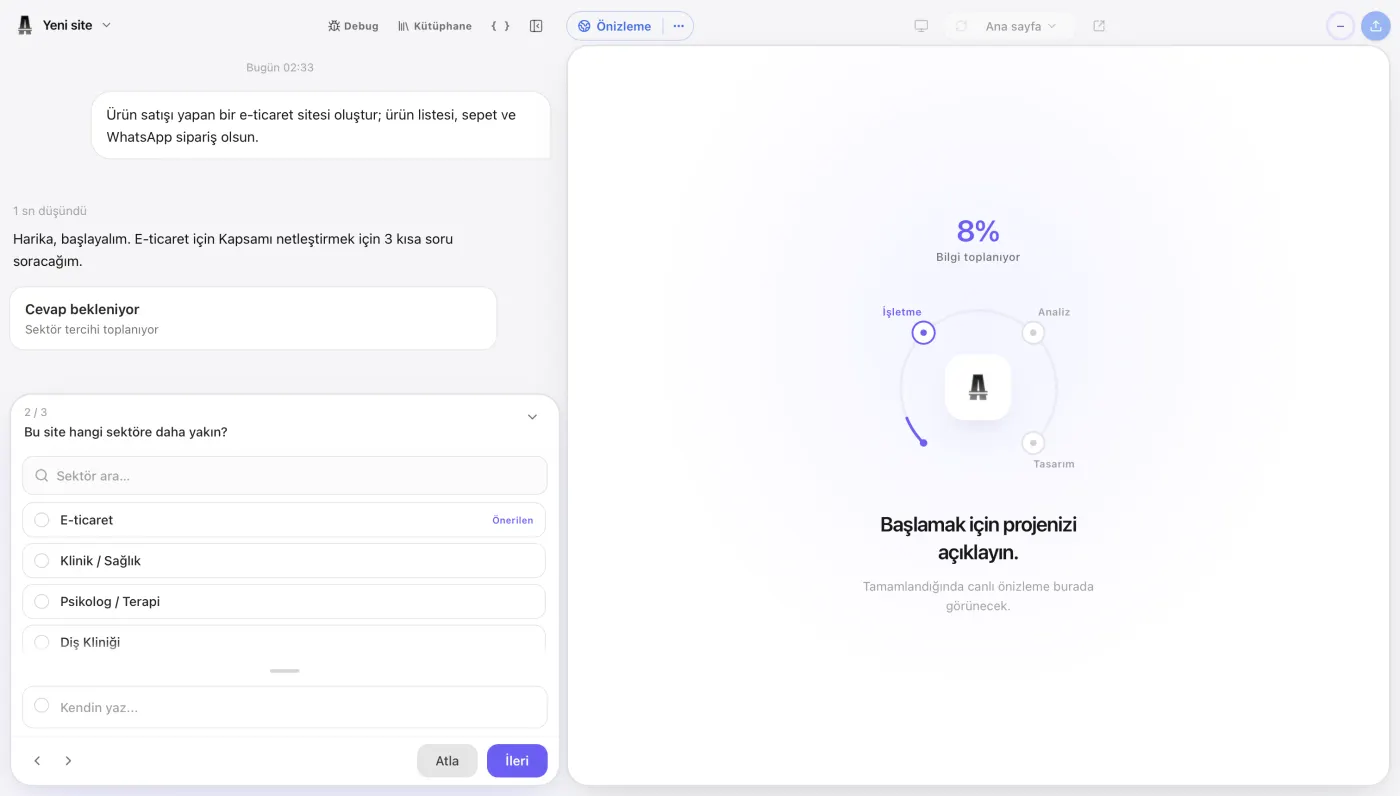
You can create your first website draft by describing the type of website you want to Emre, an AI employee, in the atalay.ai chat.
For example:
Create a modern website for a corporate cleaning company operating in Şişli, Istanbul. We provide office cleaning, factory cleaning, and post-construction cleaning services. The homepage should include services, why choose us, our process, references, customer reviews, and a free quote form. The main button should say “Get a Free Quote.”
Build a site with this prompt
Atalay AI analyzes this description and creates a page structure and starter content suitable for your business.
Websites You Can Create with Atalay AI
- Corporate website
- Small business website
- Restaurant website
- Digital menu
- Service website
- Portfolio
- Landing page
- Campaign page
- Event website
- Startup introduction page
Steps for Using Atalay AI
- Open atalay.ai.
- Describe your business and the website you want to Emre in the chat.
- Review the draft generated by AI.
- Edit the copy using your real information.
- Add your logo and photographs.
- Check the phone and WhatsApp links.
- Test the mobile layout.
- Publish your website.
Ready-to-Use Prompt for Atalay AI
Create a premium website for Atölye Meşe, a custom furniture workshop in Bursa. We offer kitchens, walk-in closets, TV units, and made-to-measure furniture. The homepage should include large project images, services, our process, completed projects, customer reviews, and a quote form. Use a modern design in light beige, dark brown, and white. The main button should say “Request a Free Site Visit” and link to WhatsApp.
Build a site with this prompt
See how your website could look before allocating a budget. Tell Emre about your business in the atalay.ai chat and try your first website free for 30 days.
Free Website Publishing Checklist
Review the following items before publishing your website.
Content
- The business name is written correctly.
- The services are listed accurately.
- The address is current.
- The phone number is correct.
- The WhatsApp number is correct.
- The email address is correct.
- The opening hours are current.
- There is no fabricated information.
- No fabricated customer reviews are used.
- Spelling errors have been corrected.
Design
- The logo appears clearly.
- Brand colors are consistent.
- The text is readable.
- The CTA button is visible.
- Images are high quality.
- Sections are in the correct order.
- There are no unnecessary animations.
- The footer is complete.
Mobile Layout
- The menu opens.
- Headings fit on the screen.
- Buttons are easy to tap.
- Forms are usable.
- Images do not overflow.
- There is no horizontal scrolling.
- The fixed WhatsApp button does not cover content.
Technical Checks
- The website uses HTTPS.
- All links work.
- The phone link works.
- The WhatsApp link works.
- Form submission has been tested.
- Social media links are correct.
- A page title has been added.
- A meta description has been added.
- Alt text has been added to images.
- A favicon has been added.
- A social sharing image has been prepared.
Legal Checks
- A privacy policy has been considered.
- Applicable data protection disclosures have been considered.
- Cookie usage has been reviewed.
- Forms contain the required consent fields.
- If the website supports e-commerce, sales and return policies have been prepared.
What Should You Do After Publishing a Free Website?
Publishing the website is not the end of the process.
First Day
- Review every page.
- Open the website on different phones.
- Submit the form.
- Click the WhatsApp button.
- Test the phone link.
- Check the social media preview.
First Week
- Share the website with your customers.
- Add it to your social media profiles.
- Add it to your Google Business Profile.
- Collect feedback from users.
- Add the most frequently asked questions to the website.
- Complete any missing service descriptions.
First Month
- Review the most visited pages.
- Measure how many people click the WhatsApp button.
- Add new customer reviews.
- Publish real project photographs.
- Create blog posts or guide content.
- Evaluate whether you need to move to a custom domain.
Frequently Asked Questions
Can You Build a Website for Free with AI?
Yes. You can build a website without coding by using free or freemium AI website builder tools. Free publishing options and feature limits vary by platform.
Do You Need Coding Skills to Create a Free Website?
No. AI website builders allow users without technical knowledge to create websites by giving instructions in natural language.
What Is a Free AI Website Builder?
A free AI website builder is an AI-powered website tool that analyzes information about a user’s business and generates a page structure, design, and starter content.
Is a Free Website Really Completely Free?
Some platforms provide permanent free plans. However, the free plan may include a platform subdomain, brand logo, traffic limit, storage limit, or page limit.
Can I Publish a Free Website Online?
Platforms that offer free publishing allow you to make your website available online on the platform’s subdomain.
Can I Connect My Own Domain to a Free Website?
This depends on the platform. Many website builders offer custom domain connections only on paid plans.
What Is a Free Subdomain?
It is a free website address provided under the platform’s own domain. For example, it may use a format such as brand.platform.com.
Can a Free Website Appear on Google?
Free websites that search engines can access and index may appear in Google results. Content quality, technical structure, and competition affect rankings.
Is a Free AI Website Builder Suitable for SEO?
Free systems that let you edit titles, meta descriptions, URLs, and alt text can be used for basic SEO. Advanced SEO features may require a paid plan.
Can AI-Generated Content Rank on Google?
Yes. Using AI to create content does not, by itself, prevent the content from ranking. The content should provide value, be accurate, trustworthy, and original.
Can You Build an E-Commerce Website with a Free AI Website Builder?
Some platforms allow you to test product pages. However, accepting payments, managing inventory, shipping, and order management usually require a paid plan.
Can You Add a WhatsApp Button to a Free Website?
If the platform allows links, you can create a button that directs visitors to your WhatsApp number.
Can You Add a Contact Form to a Free Website?
Many free website builders offer basic form support. The number of submissions or notification features may be limited.
Will a Free Website Be Mobile-Friendly?
Many modern AI website builders generate responsive websites. Even so, you should test the website on different mobile devices.
How Long Can a Free Website Remain Online?
Permanent free plans may not have a specific time limit. On platforms offering a free trial, publishing may stop or certain features may be disabled when the trial ends.
Will the Platform Logo Appear on a Free Website?
Many free plans display the platform’s logo, a banner, or footer branding. Removing this branding may require a paid plan.
Is a Free Website Secure?
Basic security can be provided if the platform offers HTTPS, secure hosting, and account protection. Form data and user access should also be reviewed.
Can a Free Website Look Professional?
A free website can look professional when it uses a strong design, real content, high-quality images, and a clear conversion goal. The platform subdomain and branding may limit the corporate impression.
Can I Upgrade a Free Website to a Paid Plan Later?
Most freemium website builders allow users to upgrade without deleting the existing website.
Can I Create a Website with Atalay AI Without Signing Up?
No. The site is built in the chat after you sign in to atalay.ai. Signing in and chatting are free; website setup is also free, and the first 30 days are a free trial.
What Is the Best Free AI Website Builder?
The best option depends on your needs. Atalay AI can be considered for Turkish-language business websites, Framer for visual portfolios, Canva for quick one-page designs, Webflow for advanced visual control, and 10Web for a WordPress-based structure.
Conclusion
Building a website for free with AI allows small businesses, entrepreneurs, and individuals to establish a digital presence quickly.
You may no longer need to:
- Learn coding,
- Use design software,
- Start with a blank template,
- Allocate a large initial budget.
By describing your business and goals to AI, you can:
- Generate a website structure,
- Prepare starter copy,
- Establish a design direction,
- Create a mobile-friendly page,
- Publish on a free subdomain.
However, do not focus only on the phrase “free creation” when choosing a free plan.
Always check:
- Free publishing
- Subdomain
- Platform branding
- Number of pages
- Traffic limit
- Form support
- SEO control
- Domain connection
- AI usage limits
- Data portability
A free plan is a strong starting point for testing a business idea, reaching your first customers, or creating a digital presence.
As your business grows, you can upgrade to a paid plan for a custom domain, advanced SEO, analytics, forms, and integrations.
You do not need to pay for the first 30 days. Tell Emre about your business in the atalay.ai chat; your website is ready within minutes and setup is free.
 Atalay AI vs Wix vs Framer vs Lovable (2026 Comparison)
 12 Best AI Website Builders in 2026: A Detailed Comparison
 How to Build a Website with AI: The Complete 2026 Guide