

An AI website builder is an AI-powered website creation tool that analyzes instructions written in natural language and automatically generates a website's design, page structure, and initial content.
With a traditional website builder, users generally need to choose a template, place sections one by one, write the copy, and edit the page design themselves.
With an AI website builder, users can describe the website they need in just a few sentences.
For example:
Create a website for a modern beauty salon serving customers in Ataşehir, Istanbul. We offer skincare, laser hair removal, and body contouring services. Visitors should be able to request a free initial consultation through WhatsApp.
Build a site with this prompt
The AI can analyze this description and identify:
- The business's industry,
- Its target customers,
- The services it offers,
- The website sections it needs,
- A suitable design style,
- The buttons that should be used,
- The primary action expected from visitors.
It then presents the user with an editable and publishable website draft.
In 2026, leading website platforms do more than simply provide templates. They can generate page structures from a user's description, write copy, define a visual direction, create new pages, and use AI to modify an existing design.
In this guide, we will examine what an AI website builder is, how it works, which features it may include, who can use it, and how to choose the right platform. For a practical walkthrough, read our How to Create a Website with AI guide. To compare available tools, see Best AI Website Builders.
In brief: An AI website builder is a tool that creates a website draft after you describe your business and the type of site you want. It can help prepare the page structure, copy, visuals, and responsive design without requiring coding or professional design skills.
What Does “AI Website Builder” Mean?
An AI website builder adds artificial intelligence capabilities to traditional website-building systems that allow users to create websites without writing code.
An AI website builder can analyze the information provided by the user and perform tasks such as:
- Defining the website's page structure
- Creating a homepage design
- Recommending a suitable color palette for the brand
- Writing headings and descriptive copy
- Preparing service or product sections
- Generating or recommending visuals
- Adding contact sections
- Creating a responsive layout for mobile devices
- Generating SEO titles and meta descriptions
- Adding new pages or sections
- Making the website ready to publish
For example, a user might enter the following prompt:
Create a modern, premium website for a custom furniture business based in Bursa. We design and manufacture kitchens, walk-in wardrobes, TV units, and made-to-measure furniture. Visitors should be able to request a free site survey through WhatsApp.
Build a site with this prompt
From this prompt, the AI website tool can understand that the business:
- Operates in the furniture industry,
- Serves customers in Bursa,
- Produces custom-made furniture,
- Wants a premium brand image,
- Offers four core services,
- Aims primarily to generate site-survey requests.
Using this information, it can create a homepage with a structure such as:
- A strong main headline
- A free site-survey button
- A services section
- Completed projects
- The working process
- Customer testimonials
- Frequently asked questions
- A WhatsApp contact section
The core value of an AI website builder is that users no longer have to start from a blank page.
How Does an AI Website Builder Work?
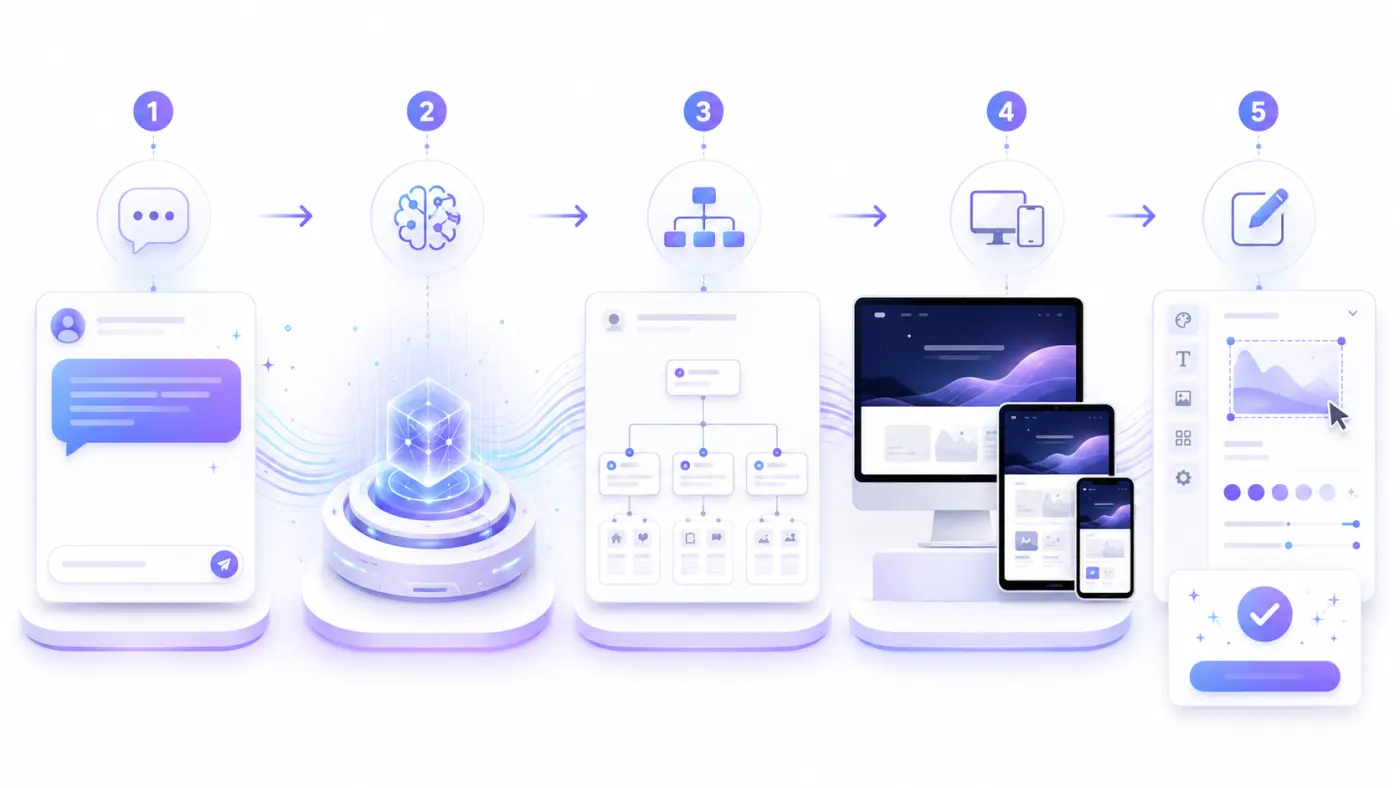
The technical infrastructure behind AI website builders can differ from one platform to another. From the user's perspective, however, the process generally consists of five stages.
1. The user explains what they need
The user describes their business or the project they want to create in natural language.
The description can be brief:
Create a modern restaurant website.
However, a more detailed description usually produces better results:
Create a website for a modern Italian restaurant in Kadıköy, Istanbul. We serve handmade pasta, wood-fired pizza, and a curated wine menu. The homepage should include the menu, restaurant photos, customer reviews, reservations, and location sections. The design should look premium and use dark green, cream, and burgundy tones.
Build a site with this prompt
Information that may be collected from the user includes:
- Business name
- Business type
- Location
- Target customer
- Products or services
- Brand personality
- Design style
- Required pages
- Required integrations
- Primary conversion goal
2. The AI analyzes the request
The AI classifies the important information contained in the prompt.
For example, the phrase “a fun dental clinic for children” may influence design decisions such as:
- Using warmer colors
- Choosing friendly language instead of a rigid corporate tone
- Highlighting pediatric dentistry services
- Adding trust-building messages for parents
- Making the appointment button highly visible
The AI does not simply copy individual words. It uses the context between them to establish a direction for the design and content.
3. The website structure is created
The AI determines which pages and sections are required based on the type of business.
For a corporate service business, it may create pages such as:
- Home
- About Us
- Services
- References
- Blog
- Contact
A restaurant may require a different structure:
- Home
- Menu
- Gallery
- About Us
- Reservations
- Location
A portfolio website may use the following structure:
- Home
- Projects
- About Me
- Experience
- Contact
A good AI website builder should not give every business the same page structure. It should create a suitable starting point based on the business's goals.
4. The design and content are generated
After defining the page structure, the AI begins generating the design and copy.
Components that may be created include:
- Hero section
- Main headline
- Supporting headline
- CTA buttons
- Service cards
- About Us copy
- Customer testimonials section
- Project gallery
- Frequently asked questions
- Contact form
- Footer
Modern tools can generate more than text from a user's description. They can also create editable page structures and recommend visual direction, colors, and typography. Squarespace Blueprint AI uses the business type and brand preferences to suggest structure, color palettes, and fonts, while Framer allows generated pages to be edited on a visual canvas.
5. The user edits and publishes the website
The first version generated by AI is not necessarily the final version.
The user can:
- Change the copy.
- Upload real business photos.
- Reorder sections.
- Add new pages.
- Change the colors.
- Enter contact information.
- Connect a custom domain.
- Publish the website.
Wix, Hostinger, Framer, and similar platforms allow users to modify the AI-generated starting website through visual editors before publishing it.
The Difference Between an AI Website Builder and a Traditional Website Builder
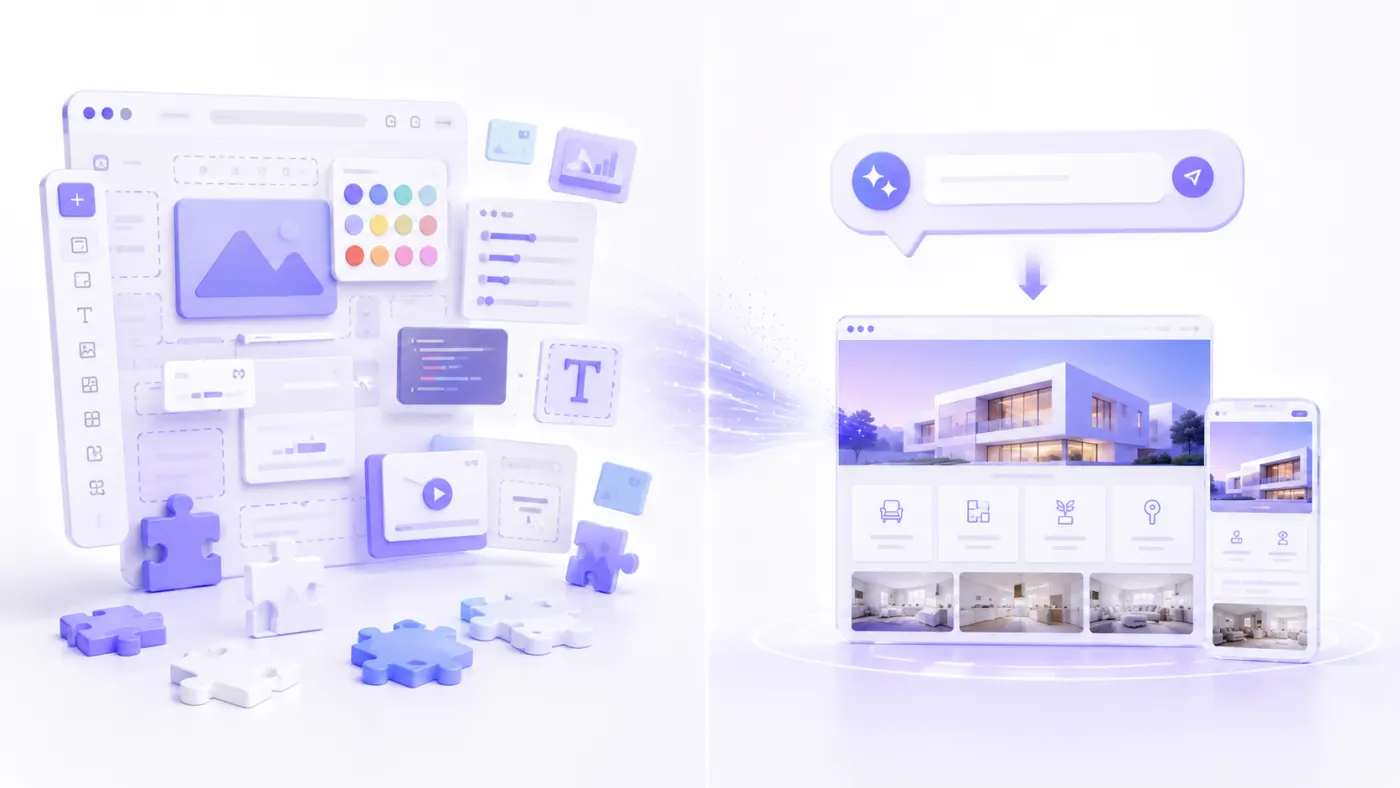
Traditional website builders also allow users to create websites without coding. However, they generally require more manual work from the user.
Traditional website builder process
The user typically:
- Chooses a template.
- Creates pages.
- Adds sections.
- Writes the copy.
- Selects visuals.
- Defines the colors.
- Adjusts the mobile layout.
- Completes the SEO fields.
- Publishes the website.
AI website builder process
The user:
- Describes the business.
- Reviews the website generated by AI.
- Makes the necessary edits.
- Adds real business information.
- Publishes the website.
| Feature | Traditional website builder | AI website builder |
|---|---|---|
| Starting point | Template or blank page | Natural-language prompt |
| Page structure | Created by the user | Can be suggested by AI |
| Initial copy | Written by the user | Can be generated by AI |
| Design direction | Defined by the user | Can be suggested by AI |
| Colors and typography | Selected manually | Can be recommended automatically |
| Technical knowledge | Low | Very low |
| Time to first draft | Hours or days | Seconds or minutes |
| Customization | Depends on the platform | Depends on the platform |
| Post-publish editing | Usually available | Usually available |
The fundamental difference is this:
A traditional website builder provides the tools you need to build the website yourself. An AI website builder attempts to create the website's first version for you.
Build a site with this prompt
What Features Does an AI Website Builder Have?
Not every AI website builder offers the same capabilities. A tool that only generates text should not automatically be considered a complete website builder.
A strong platform may include some or all of the following features.
Creating a website from a prompt
The user describes the website they want in natural language.
Example:
Create a minimalist portfolio website for an architecture studio based in Izmir.
The AI generates a website draft from this description.
Automatic page structure
The system can recommend pages based on the type of business, such as:
- Home
- About Us
- Services
- Projects
- Contact
This feature reduces the burden of deciding which pages need to be created.
AI copy generation
AI can prepare copy such as:
- Main headline
- Supporting description
- Service descriptions
- Product descriptions
- About Us copy
- CTA copy
- Frequently asked questions
- Blog drafts
- Meta descriptions
All generated copy should be reviewed for accuracy and originality.
Design generation
AI can provide a starting point for decisions such as:
- Page layout,
- Color palette,
- Font pairing,
- Card structures,
- Spacing system,
- Visual placement.
Image generation
Some systems can generate AI images based on the user's needs.
For example:
Create an image of a modern, bright dental clinic waiting room.
For local businesses, real photos of the premises and team can often build stronger trust whenever they are available.
Responsive design
The website should adapt to desktop, tablet, and smartphone screens.
Hostinger states that websites created with its AI tool are responsive by default and that mobile layouts can be edited through its visual editor. Google also recommends responsive web design because it is easier to implement and maintain.
Visual editor
It is important that users can perform actions such as the following on the AI-generated website:
- Change a heading
- Replace an image
- Add a section
- Delete a section
- Move a section
- Change colors
- Add a page
- Change a button link
SEO settings
A professional AI website builder should allow users to edit SEO fields such as:
- Page title
- Meta description
- URL
- Image alt text
- Canonical URL
- Robots settings
- Sitemap
- Redirects
Domain and hosting
Some platforms include hosting in their plans.
The user can:
- Publish the website on a platform subdomain.
- Connect a custom domain.
- Use a secure SSL connection.
Forms and communication tools
The website may include communication options such as:
- Contact form
- Quote request form
- WhatsApp button
- Click-to-call link
- Email link
- Appointment form
- Reservation form
E-commerce features
E-commerce-focused AI website builders may include:
- Product pages
- Collections
- Shopping cart
- Payments
- Inventory tracking
- Order management
- Product description generation
Shopify integrates AI capabilities into store creation, product content, marketing, customer support, and operational processes.
CMS and blog management
For content-driven businesses, important features include:
- Creating blog posts
- Managing categories
- Author information
- Scheduled publishing
- Dynamic content pages
- SEO fields
Design-focused platforms such as Framer and Webflow offer AI generation alongside CMS, SEO, and publishing systems.
What Types of Websites Can Be Created with an AI Website Builder?
AI website builders can provide a strong starting point, particularly for content-driven and promotional websites.
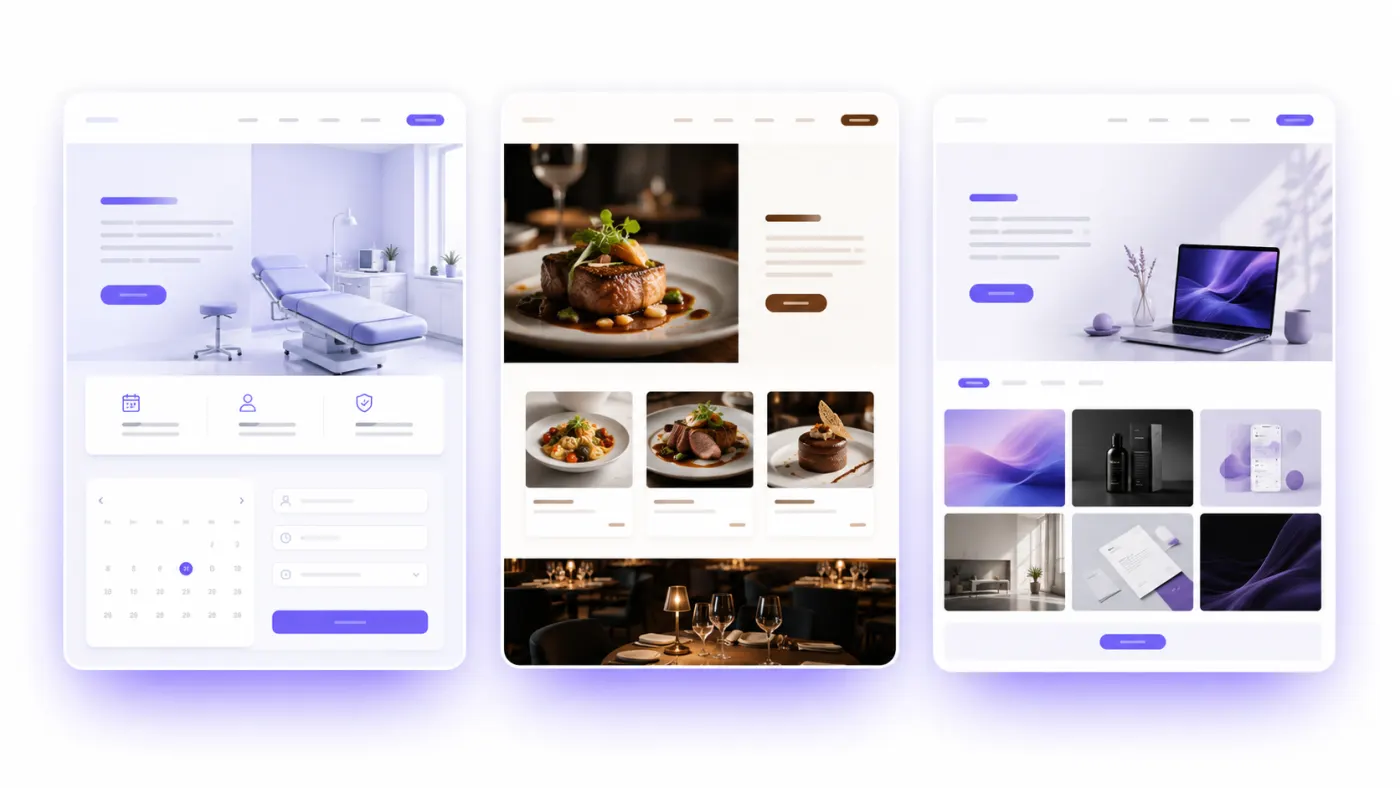
Corporate website
These websites present a company's services, team, references, and contact information.
Example industries include:
- Software companies
- Construction companies
- Consulting firms
- Logistics companies
- Manufacturing companies
- Architecture studios
Small business website
Local businesses can establish an online presence in a short time.
Examples include:
- Hair salons
- Beauty salons
- Restaurants
- Cafés
- Pilates studios
- Auto repair shops
- Cleaning companies
- Private education centers
Landing page
A single-page, conversion-focused website can be created for a specific product, service, or campaign.
The goal of a landing page may be to:
- Collect leads through a form
- Sell a product
- Drive app downloads
- Collect preregistrations
- Generate quote requests
- Register attendees for an event
Portfolio
Designers, developers, photographers, and other professionals can showcase their projects.
Restaurant and digital menu website
The following sections can be created:
- Menu
- Gallery
- Reservations
- Opening hours
- Map
- WhatsApp ordering
- Customer reviews
Blog and content website
Tools with CMS support can create blogs with category, author, and article pages.
E-commerce website
Products can be sold through platforms that include e-commerce infrastructure.
However, generating the design alone is not enough. The following features should also be evaluated:
- Payment infrastructure
- Shipping integrations
- Tax settings
- Inventory management
- Returns process
- Invoicing integration
- Order management
Personal website
A personal brand, résumé, biography, social media links, and contact information can be presented on a single website.
Event website
For a conference, wedding, seminar, or community event, sections such as the following can be prepared:
- Event schedule
- Speakers
- Location
- Registration form
- Frequently asked questions
- Sponsors
Who Is It Suitable For?
Who Should Use an AI Website Builder?
Business owners without technical knowledge
It is suitable for users who want to build a website quickly without knowing how to code or design websites.
Small and medium-sized businesses
It provides an accessible starting point for businesses whose primary needs are presenting their services and collecting customer inquiries.
New entrepreneurs
A landing page can be prepared quickly to test whether there is demand for a business idea.
Freelancers
Professionals who want to create a portfolio or personal brand website can use these platforms.
Marketing teams
They can quickly create landing-page drafts for new campaigns or products.
Agencies
They can prepare initial drafts, concepts, or lower-scope websites for client projects.
Students
They can create websites for class projects, portfolios, events, or personal use.
When Might an AI Website Builder Not Be Enough?
A website builder is not the right solution for every project.
Custom software development may be required for projects such as:
- Multi-vendor marketplaces
- Custom social media platforms
- Complex membership systems
- Industry-specific management panels
- Advanced CRM systems
- ERP integrations
- Logistics management systems
- Custom payment distribution systems
- Real-time data applications
- Complex authorization rules
- Platforms that share infrastructure with a mobile application
- Large-scale SaaS products
An AI website builder can create a website, but it should not be assumed that it can automatically develop every custom business operation.
Advantages of AI Website Builders
A very fast start
A first draft that could take hours or days using traditional methods can be generated within minutes.
Platforms such as Wix and Hostinger state that users can describe their businesses and generate editable website drafts within minutes.
No coding required
Users do not need to know HTML, CSS, or JavaScript.
Eliminating the blank-page problem
Instead of forcing users to decide where to begin, the platform provides an editable draft.
Faster copy creation
It can generate a starting point for headlines, descriptions, and service copy.
Easier design decisions
It can recommend colors, typography, and section order.
Lower initial cost
For a simple corporate website, it may cost less than custom software development.
Rapid testing
Different headlines, CTAs, and design directions can be tested quickly.
Easier updates
Business owners can make content changes without relying on a technical team.
A responsive starting point
Many modern systems generate responsive page structures.
Saving time for the business
Business owners can focus on services, customers, and sales rather than technical details.
Disadvantages of AI Website Builders
Risk of generic designs
Short and vague prompts can produce websites that look similar to one another.
Possibility of inaccurate information
AI may guess business information it does not know.
For example, it may generate:
- A false founding year
- A service the business does not offer
- An incorrect price
- A fabricated customer review
- A nonexistent certification
All content should therefore be reviewed before publication.
Platform dependency
Moving the website to another platform may be difficult.
Limited custom functionality
Custom workflows that are not supported by the platform may not be possible to build.
Weak brand identity
Without real visuals, a brand story, and original copy, the website may look generic.
SEO results are not automatic
Creating a website with AI does not mean that it will automatically rank highly on Google.
Hidden costs
Additional charges may apply to features such as:
- Custom domain
- E-commerce
- Additional traffic
- Additional storage
- AI credits
- Multiple languages
- Premium integrations
Overreliance on the first draft
Before publication, the initial draft should be reviewed for content, mobile appearance, links, and the conversion flow.
How Do You Choose a Good AI Website Builder?
When selecting a tool, it is not enough to look only at how attractive the first generated screen appears.
Evaluate the following criteria.
1. Language support
The AI should accurately understand prompts and business terminology in the languages you intend to use.
For Turkish-language use, it can be tested with prompts such as:
Create a website for a boutique bakery in Kadıköy.
Create a website for a certified public accountant serving corporate companies.
Create a clinic website offering hair transplantation and medical aesthetics services.
The system should use Turkish characters, place names, and service names correctly.
2. Generation quality
Review the following points in the first draft:
- Has the business been understood correctly?
- Are the services ordered appropriately?
- Is the design suitable for the industry?
- Is the main CTA visible?
- Does the website look professional?
- Does the copy sound natural?
3. Editing individual pieces of content
Users should not be forced to regenerate an entire section whenever they want to make a small change.
They should be able to edit the following items individually:
- Headline
- Description
- Button text
- Image
- Link
- Service name
- Card content
4. Design flexibility
The platform should support changes such as:
- Changing colors
- Changing fonts
- Moving sections
- Adding sections
- Deleting sections
- Adjusting spacing
- Editing the mobile layout
5. Mobile responsiveness
Test generated websites on real smartphones.
Check the following:
- Does the menu open correctly?
- Do any headings overflow?
- Are the buttons easy to use?
- Do the forms work?
- Is there any horizontal scrolling?
- Does the page load quickly?
6. SEO control
Users should be able to edit:
- Title
- Meta description
- URL
- Alt text
- Canonical URL
- Robots settings
- Sitemap
- Redirects
7. Custom domain support
Users should be able to connect their own domain.
Example:
businessname.com
8. SSL and hosting
Review the platform's support for:
- HTTPS
- Hosting
- Backups
- CDN
- Traffic capacity
- Uptime
9. Communication and conversion tools
Depending on the business's needs, look for features such as:
- Click-to-call button
- Forms
- Reservations
- Appointments
- Payments
- Maps
- Analytics
10. Post-publish updates
It should be easy to make changes after the website has been published.
Platforms such as Hostinger and Squarespace allow users to edit content, pages, and designs after publication.
11. Data portability
Find out how content can be exported if you decide to change platforms.
12. Pricing
Evaluate the long-term total cost, not only the introductory price.
| Cost item | What to check |
|---|---|
| Subscription | Monthly or annual fee |
| Domain | Whether it is included in the plan |
| Whether it requires an additional fee | |
| E-commerce | Which plan includes it |
| AI usage | Credit or usage limits |
| Traffic | Visitor or bandwidth limits |
| Storage | Image and file capacity |
| Commission | Whether a fee is deducted from sales |
| Multiple languages | Whether an additional fee is required |
SEO, Security, and Alternatives
Is an AI Website Builder Good for SEO?
A website created with an AI website builder can perform well in search engines.
However, the platform should provide technical capabilities such as:
- Search-engine-accessible HTML
- Fast loading times
- Mobile responsiveness
- Editable page titles
- Meta descriptions
- Clean URL structures
- Image alt text
- Sitemap
- Canonical support
- HTTPS
- Redirect management
Content quality is equally important.
Google states that the use of AI to create content is not, by itself, a negative signal. The primary focus should be on whether the content is useful, trustworthy, and created for people. Automatically producing large numbers of low-value pages may, however, be considered scaled content abuse.
For this reason, AI-generated copy should be:
- Fact-checked,
- Customized for the business,
- Enriched with real examples,
- Written to answer the user's question clearly.
How can you improve AI-generated content?
Add elements such as:
- Real business information
- First-hand experience
- Project examples
- Team information
- Expert opinions
- Original photographs
- Customer questions
- Pricing information
- Service process
- Areas served
Google's 2026 guidance on AI search also explains that traditional SEO fundamentals continue to apply to AI-powered search experiences and that original, helpful content remains important.
Are AI Website Builders Secure?
Security depends more on the infrastructure of the selected platform than on whether the website was generated with AI.
When choosing a platform, review features such as:
- HTTPS and SSL
- Secure user authentication
- Two-factor authentication
- Regular backups
- Data encryption
- Role and permission management
- Protection of form data
- Payment security
- Security updates
- Privacy policy
- Data export
- Account deletion
What users should pay attention to
- Use a strong password.
- Enable two-factor authentication when available.
- Remove unnecessary user access.
- Do not install untrusted plugins.
- Do not collect unnecessary personal data through forms.
- Do not store payment card details on your own server.
- Take regular backups.
- Protect the account used to manage your domain.
Personal-data processes should be evaluated separately in sensitive industries such as healthcare, law, and finance.
The Difference Between an AI Website Builder and Custom Software
An AI website builder and custom software are not direct substitutes for one another.
They address different needs.
| Criterion | AI website builder | Custom software |
|---|---|---|
| Time to launch | Very fast | Longer |
| Initial cost | Lower | Higher |
| Technical knowledge | Low | Requires a technical team |
| Design freedom | Limited by the platform | Very high |
| Custom functionality | Limited | Developed according to requirements |
| Maintenance | Can be managed by the platform | Managed by a technical team |
| Data model | Depends on a predefined structure | Can be designed specifically |
| Integrations | Limited to available integrations | Can be custom-developed |
| Scalability | Depends on the platform | Planned according to the architecture |
| Best use case | Promotional and content websites | Complex digital products |
Choose an AI website builder when:
- You need a corporate website quickly
- You want to present your services
- You are creating a landing page
- You do not have a technical team
- Your budget is limited
- You want to test a business idea
Choose custom software when:
- Custom user roles are required
- The project includes a complex payment system
- The infrastructure will be shared with a mobile application
- Business-specific operations need to be developed
- You are creating a large-scale SaaS product
- Custom integrations are required
The two approaches can also be used together in some projects.
For example, a company's promotional website may be created with an AI website builder, while its custom customer portal is developed by a software team.
How Are AI Website Builders Changing in 2026?
The first generation of AI website builders selected a predefined template based on answers to a few questions.
New-generation systems are more conversational.
Users can:
- Create a website.
- Request a new page.
- Change a section.
- Update the design direction.
- Rewrite copy.
- Generate visuals.
- Optimize existing pages.
In 2026, Wix introduced Harmony as a new-generation website builder that combines AI generation with visual editing control. Webflow expanded its AI site builder with capabilities such as page and CMS content generation, SEO, and AEO optimization.
This shift is transforming website creation from a process of “choosing a template” into a process of “describing what you want and collaborating on the result.”
Creating a Website with Atalay AI
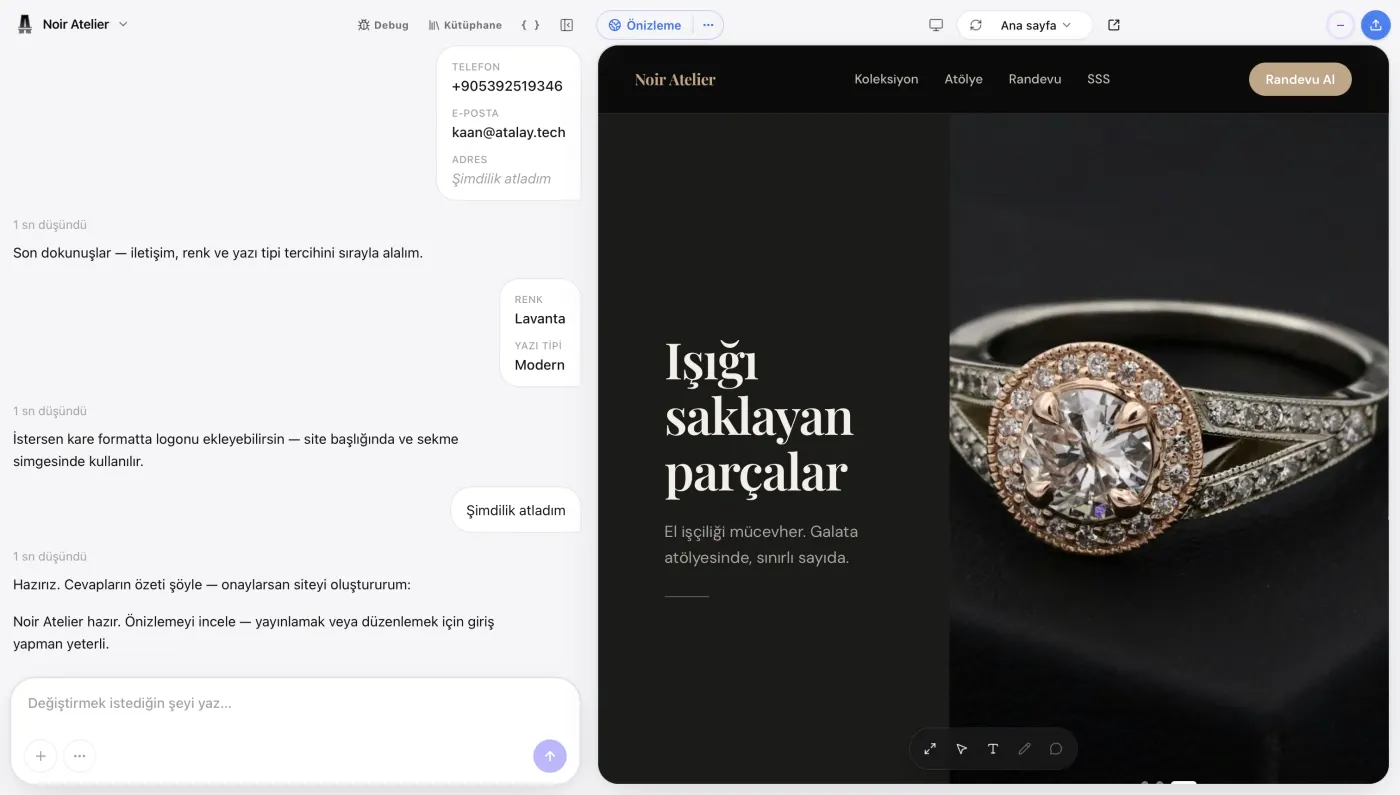
Atalay AI is the AI for Turkish-speaking businesses. Its website product is Atalay Website (atalay.website): your site is built in the atalay.ai chat by talking to Emre, an AI employee. For practical steps, see the How to Build a Website with Atalay AI guide.
The user writes in the chat what kind of website they need.
For example:
Create a website for a corporate cleaning company operating in Istanbul. We provide office cleaning, factory cleaning, and post-construction cleaning services. The homepage should include services, why choose us, our process, customer reviews, frequently asked questions, and a quote request form. The main button should say “Get a Free Quote.”
Build a site with this prompt
Atalay AI analyzes the description and creates a suitable starting website for the business.
Websites you can create with Atalay AI
- Corporate website
- Small business website
- Service website
- Restaurant website
- Digital menu
- Portfolio
- Landing page
- Campaign page
- Startup website
How Atalay AI works
- Describe the website you want to Emre in the atalay.ai chat.
- Review the website generated by AI.
- Customize the copy and visuals for your business.
- Add your contact details.
- Check the mobile layout.
- Publish your website.
Setup is free and the first 30 days are a free trial. After that, Atalay Website packages start at ₺490/month, excl. VAT: on Starter your site is published at yourname.atalay.website, and on Professional at your own domain.
Example prompt for Atalay AI
Create a modern website for a premium Pilates studio in Ataşehir. We offer reformer Pilates, private sessions, and prenatal Pilates. Our target audience is women aged 25–45. The homepage should include services, instructors, studio photos, customer reviews, frequently asked questions, and a WhatsApp contact section. The design should feel spacious and premium, using white, beige, and light green. The main button should say “Book a Free Trial Session.”
Build a site with this prompt
Ready to create your website? Tell Emre about your business in the atalay.ai chat and your website is ready within minutes. Try it free for 30 days.
Preparation and Common Mistakes
What Should You Prepare Before Using an AI Website Builder?
For better results, prepare the following information:
- Business name
- Short business description
- List of services
- Target customer
- Cities or regions served
- Brand colors
- Logo
- Phone number
- WhatsApp number
- Email address
- Full address
- Opening hours
- Social media accounts
- Real business photos
- Team information
- Customer reviews
- Frequently asked questions
- Primary conversion goal
The more detailed this information is, the fewer edits the generated website will require.
Common Mistakes When Using an AI Website Builder
For ready-to-use command templates, see Website Prompt Examples. To compare tools side by side, read Best AI Website Builders.
Writing a vague prompt
Instead of:
Create a beautiful website.
use a clearer prompt such as:
Create a modern website for a corporate catering company serving customers in Istanbul.
Publishing fabricated information
AI-generated items such as:
- Customer reviews,
- Statistics,
- Certifications,
- Addresses,
- Team members
should not be published without verification.
Leaving the first draft unchanged
The first draft should be customized for the brand.
Failing to test the mobile layout
The website should be checked at different screen sizes.
Not using a CTA
The next step should be made clear to the visitor.
Example CTAs include:
- Get a Free Quote
- Book an Appointment
- Contact Us on WhatsApp
- View the Menu
- Explore Our Projects
- Try for Free
Leaving SEO fields empty
A descriptive title and meta description should be created for every page.
Using too many AI-generated images
Real business photos may be more effective at building trust.
Hiding contact information
Phone numbers, addresses, and contact options should be easy to find.
Frequently Asked Questions
What is an AI website builder?
An AI website builder is an AI-powered tool that creates a website's structure, design, and initial content from descriptions written in natural language.
How does an AI website builder work?
The user describes their business and the website they want. The AI analyzes the request and generates the necessary pages, sections, copy, and design direction. The user then edits and publishes the result.
Do you need coding skills to use an AI website builder?
No. The main purpose of these tools is to enable users without technical knowledge to create websites without writing code.
Are AI website builders free?
Some platforms offer free creation or trial options. A paid plan may be required for a custom domain, higher usage limits, and advanced features.
Can you create a professional website with an AI website builder?
Yes. A professional website can be created when the design, content, mobile responsiveness, and communication flows are configured correctly.
Can a website created with an AI website builder be edited?
Most platforms allow users to change the website's copy, visuals, colors, sections, and pages.
Can you create an e-commerce website with an AI website builder?
Platforms with e-commerce support can create product and sales pages. Payment, inventory, shipping, and invoicing capabilities should be reviewed separately.
Are AI website builders good for SEO?
Fast, responsive platforms that allow users to control technical SEO fields can be suitable for SEO. The content must also be original, helpful, and accurate.
Can AI-generated content rank on Google?
Yes. The fact that content was created with AI does not, by itself, prevent it from ranking. Google focuses on whether content provides value, is trustworthy, and satisfies search intent.
Are AI website builders secure?
Security depends on the selected platform. SSL, backups, data protection, access management, and security updates should be reviewed.
Can an AI website builder create a responsive website?
Most modern AI website builders create responsive websites. Even so, the mobile layout should be tested on real devices.
Can you connect a custom domain to an AI website builder?
This depends on the platform. Many professional systems allow users to connect their own domain.
Can you create a blog with an AI website builder?
Platforms with CMS and blogging support can create category, author, and article pages.
Can you build a web application with an AI website builder?
Some AI tools can create applications that include databases and user accounts. However, most traditional AI website builders focus primarily on content and promotional websites.
Are AI website builders and no-code tools the same thing?
Not exactly. No-code tools allow users to create digital products without writing code. An AI website builder is a specific type of no-code tool focused on generating websites with the help of artificial intelligence.
How do you choose the best AI website builder?
Language support, design quality, editing flexibility, mobile responsiveness, SEO features, custom-domain support, hosting, integrations, and total cost should be evaluated together.
How long does an AI website builder take to create a website?
The first draft can be created in a few seconds or minutes. Adding real content, refining the design, and testing the website may take longer.
Are AI website builders suitable for small businesses?
Yes. They are particularly suitable for small businesses that want to present their services, collect inquiries, and establish an online presence quickly.
Will AI website builders replace agencies?
They can meet some simple and standardized website needs. Professional teams remain important for original brand strategy, custom design, complex integrations, and custom software projects.
Conclusion
An AI website builder is an AI-powered technology that makes website creation faster and more accessible.
Users no longer have to:
- Start from a blank page,
- Learn how to code,
- Write every piece of copy from scratch,
- Design every section one by one.
AI can:
- Analyze the business's needs.
- Create the page structure.
- Write initial copy.
- Define a design direction.
- Provide a responsive starting point.
However, human review is still necessary to create a successful website.
Before publishing:
- Verify all information.
- Customize the copy for your business.
- Add real visuals.
- Test the mobile layout.
- Complete the SEO fields.
- Check all forms and buttons.
- Define the primary conversion goal clearly.
When used correctly, an AI website builder does more than shorten the design process. It helps a business establish its digital presence faster, test an idea, and reach new customers.
Create a professional website without writing code. Tell Emre about your business in the atalay.ai chat and your website is ready within minutes.
 Atalay AI vs Wix vs Framer vs Lovable (2026 Comparison)
 12 Best AI Website Builders in 2026: A Detailed Comparison
 How to Build a Website for Free with AI: 2026 Guide